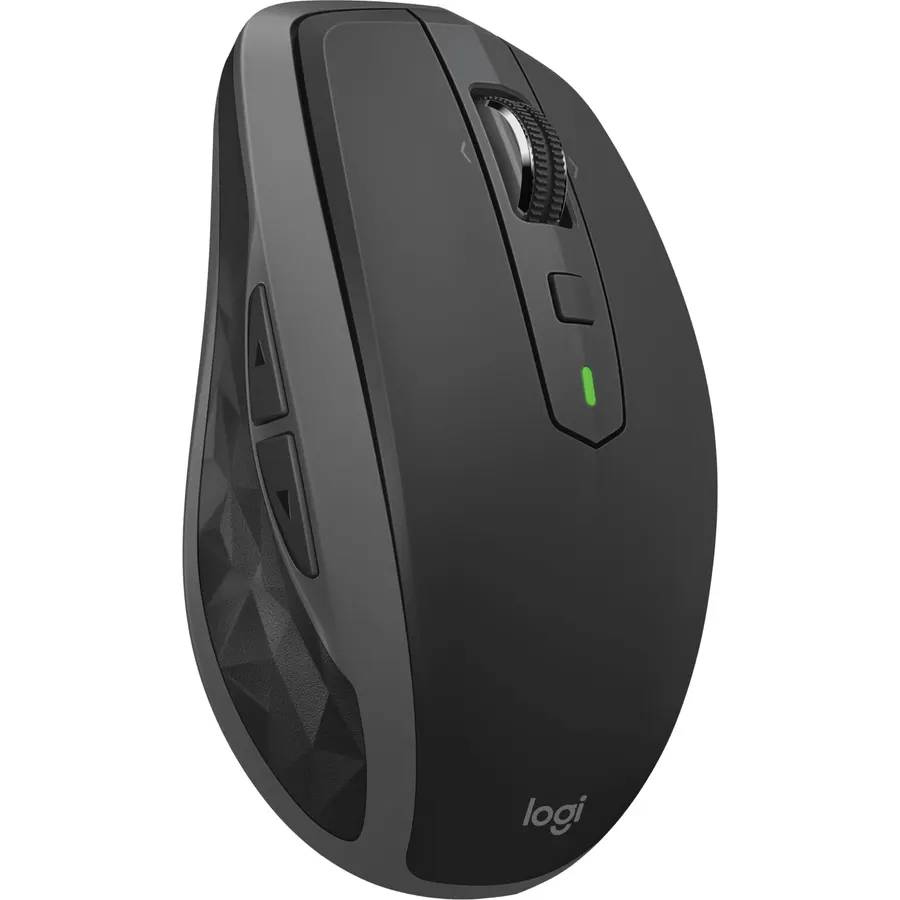
Quick answer The Logitech MX Anywhere 2S Bluetooth Edition scores 8.6/10 with us. Amazon owners rate it 4.3 out of 5 across 925 reviews, in line with the 4.4 average of the 166 products we track in Mice. It was listed at $49.99 on Amazon when we last checked in September 2026. Key facts: battery average life 2 months, connectivity technology Bluetooth, operating system Windows, macOS.
The MX ANYWHERE 2S is the advanced mobile mouse for power users. Harness the power of Logitech Flow and take multi-computer use to a bold new level. Control up to three computers and seamlessly move text, images and files between devices.
Scroll through documents and web pages faster and easier with the hyper-fast scroll wheel. MX ANYWHERE 2S is ready when you are. It holds a full charge for over two months and in just three minutes you get enough power for a full day of usage.
Work virtually anywhere with high precision tracking --even on glass.* Its compact, sculpted shape is crafted to provide the control you need anywhere- at home, at work or on the go. *4mm min thickness.
Do Best Deal is a participant in the Amazon Services LLC Associates Program. As an Amazon Associate we earn from qualifying purchases. If you buy through links on this site we may earn a commission, at no extra cost to you. Learn more.
Product information
24 specifications
Additional Features
Lightweight, Portable, Rechargeable, Wireless
Antenna Location
Gaming, Office
Battery Average Life
2 months
Brand
Logitech
Button Quantity
7
Color
Graphite
Compatible Devices
Personal Computer, Tablet, Smartphone
Connectivity Technology
Bluetooth
Enclosure Material
Plastic
Hand Orientation
Right
Hardware Platform
Mac, PC
Included Components
MX Anywhere 2S, Micro-USB cable for recharging, User documentation
Item Weight
6.4 ounces
Mfr Part Number
910-007232
Model Name
2024 Model
Model Number
910-007232
Mouse Maximum Sensitivity
4000 dots_per_inch
Movement Detection
Optical
Number of Batteries
1 Lithium Polymer batteries required. (included)
Operating System
Windows, macOS
Power Source
Battery Powered
Range
5.0 meters
Style Name
Micro USB Charge
Warranty Description
1 Year Limited Hardware Warranty
Pros & cons
What we like
Pointing Device Connectivity Technology: Wireless
Pointing Device Wireless Technology: Bluetooth/Radio Frequency
Pointing Device Wireless Operating Distance: 33 ft
Movement Detection: Darkfield
What could be better
Logitech MX Anywhere 2S Bluetooth Edition: questions & answers
Is the Logitech MX Anywhere 2S Bluetooth Edition worth buying?
Yes, it is one of the stronger picks in its group. We score the Logitech MX Anywhere 2S Bluetooth Edition 8.6 out of 10. Amazon owners rate it 4.3 out of 5 across 925 reviews, in line with the 4.4 average of the 166 products we track in Mice.
How much does the Logitech MX Anywhere 2S Bluetooth Edition cost?
It was listed at $49.99 on Amazon when we last checked in September 2026. Amazon prices change daily, so use the price button on this page to see the current figure.
What are the key specs of the Logitech MX Anywhere 2S Bluetooth Edition?
Battery Average Life: 2 months; Connectivity Technology: Bluetooth; Operating System: Windows, macOS. All 24 specifications are in the product information table on this page.
What are good alternatives to the Logitech MX Anywhere 2S Bluetooth Edition?
Similar, well-rated products in our catalog: Logitech M196 Compact Ambidextrous Bluetooth (9.8/10, 4.5 stars from 6,214 owners); Logitech MX Anywhere 3 Compact Performance (9.6/10, 4.8 stars from 924 owners); Logitech POP Mouse (9.2/10, 4.6 stars from 3,834 owners).
Breakdown from the 10 most helpful reviews we imported.
M
M
Verified purchaseJuly 4, 2026
My Only Mouse For Windows and Mac
This is a great replacement for the Logitech unifying mice I've been using for the past couple of decades. Perfect size, feel, response... everything.And the primary reason I got this... it works on any surface, including glass. So nice not having to to carry around a mouse pad or an impromptu piece of paper to get the mouse to track.I was hesitant to get this since I really didn't want a non-replaceable battery model. But looks like there are some replacement batteries, if/when this one stops holding a charge. I've used this for a week and the battery still shows 90%, which is the same level
N
Nade
Verified purchaseJuly 18, 2026
Good
I’ve been using this mouse for two years now, and it’s been a reliable on Fedora, Win 11, and MacOS. Switching between them has been smooth sailing, and it hasn’t disconnected a single time since I got it.I use it every day, and I’m surprised I haven’t charged it more than four times in the last two years.If I ever need another mouse, I’d definitely buy this one again.
J
Justin S Eggspuehler
Verified purchaseMarch 17, 2026
Perfect Travel Mouse — Compact, Comfortable, and Easy to Pair
I’ve been using the Logitech MX Anywhere 2S Bluetooth Mouse and it’s been an excellent option for both travel and everyday use.The setup was quick and easy — it paired seamlessly with my MacBook via Bluetooth with no issues. One of my favorite features is the ability to switch between multiple devices, which is really convenient if you’re working across a laptop and another computer.It’s small and compact, making it perfect for travel or remote work setups, but it still feels comfortable and natural in the hand. That balance is hard to find in a portable mouse.Performance-wise, it tracks well
V
Vincenzo C Brancato
Verified purchaseFebruary 26, 2026
Did not realize the scroll wheel middle click changes the type of scroll.
EDIT: I just now realized that the scroll wheel's middle click changes the scrolling style. It can switch between the loose and free-spinning style, or the more typical notched scrolling style. This makes me change my review and rating from a 2 to a 4. I personally would have preferred a normal middle click, as some of my art programs benefit from being able to middle-click AND drag. I haven't figured out if Options+ allows this behavior. I've only been able to find making it able to middle click, but I think I can just re bind those behaviors.I already ordered another mouse, so either the bet
V
VectoR7II7
Verified purchaseJuly 6, 2026
Best mouse on planet Earth.
The mx anywhere 2 has been my daily mouse for 8-9 yrs now. Just like John Dietrich mentioned in his review below, USB mini was taking off when I purchased the 2. Definitely figured that wouldve been updated to usbc by now on the 2s. But it's still a micro USB. That is the only disappointment from a nearly perfect mouse. This thing is small ( but not too small) light, easy traveler, multi device, strong Bluetooth, battery lasts months. Everyone raves about the mx master, but the mx anywhere is the one to beat imo. Buy with confidence.
J
Jon
Verified purchaseJune 6, 2026
Mouse in your pocket
II bought this mouse for my girlfriend, and she got her money’s worth. It’s a great mouse that’s easy to use. It’s smooth and lightweight, and it’s much smaller than the bigger brother. It’s also very ergonomic and looks great. It’s easy to store, and it connects seamlessly, just like it’s supposed to.
T
Turhan Yildiz
Verified purchaseOctober 11, 2025
Extremely disappointed and annoyed by the logitech incompetency
I purchased Logitech MX Anywhere 2S mice about a month ago.First of all, logitech.com is an incompetent company to resolve the problems/issues related to their products.1. Their web site is NOT functional. I have been trying to do the product registration on logitech.com. After completing the form for product registration, they ask you to click on the "Submit" button. When the "Submit" button is clicked, their web site goes into an endless "loading" mode and web site freezes. I tried the registration with three different web browsers and at different hours of the day, etc. without any result.2
W
William
Verified purchaseMay 13, 2026
Okay, but disappointing
I love this mouse but the largest problem I have (and this goes for many pc accessories these days) is that many features that should be hardware based are locked by registing the product and downloading an application for it.It's totally uncalled for especially on a basic mouse and terrible business practice.I also can't tell if this doesn't have a middle mouse button click (wheel) or it's so sensitive and you may need the "app" but even a slight press on the wheel feels like it will break
Customer reviews are shown as published on Amazon and are not written by Do Best Deal.
More mice we compared
Alternatives to the Logitech MX Anywhere 2S Bluetooth Edition