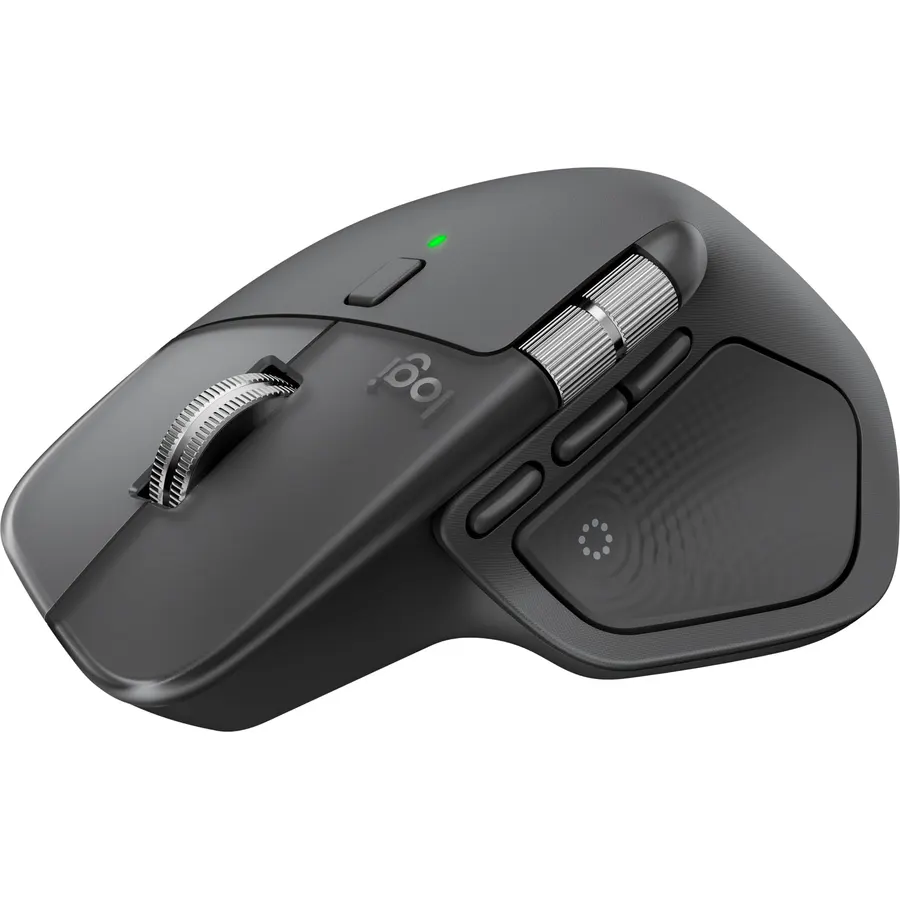
Precision you can feel with the Haptic Sense Panel; customizable (1) haptic feedback on specific actions, shortcuts, notifications enhancing
Battery Average Life70 days
About this item
Precision you can feel with the Haptic Sense Panel; customizable (1) haptic feedback on specific actions, shortcuts, notifications enhancing productivity on this wireless Bluetooth mouse
Effortlessly access favorite tools with Actions Ring (2) on this MX Series mouse—a dynamic, customizable overlay adapts to each app, placing most used filters, adjustments, and shortcuts at your cursor
Scroll 1,000 lines per second and stop on a pixel with the MagSpeed scroll wheel—Logitech’s fastest (3), quietest, and most precise (4) scrolling experience
Enjoy 2X more powerful connectivity (7) with a USB-C dongle, advanced radio chip, and optimized antenna for faster, stronger, reliable performance—or use Bluetooth for more versatility
Ergonomic mouse designed for comfort, MX Master 4 keeps you in flow with a natural tilt, intuitive buttons, and a thumb scroll wheel that reduces hand stress for fluid navigation
Quiet Clicks on MX Master 4 reduce noise and distractions, offering a soft, satisfying feel with 90% less click noise (8)—perfect for focused workflows
Get a complimentary 1-month Adobe Creative Cloud subscription with your purchase of MX Master 4
Designed for a positive future: Plastic parts include recycled plastic - 54% Graphite; 48% Pale Grey (12); 100% recycled cobalt in the battery; built to last with improved stain resistance (7)
Precision you can feel with the Haptic Sense Panel; customizable (1) haptic feedback on specific actions, shortcuts, notifications enhancing
Ranked #99 in Mice · 4 things we like
Quick answer The Logitech MX Master 4 Ergonomic Wireless Mouse scores 8.6/10 with us. Amazon owners rate it 4.3 out of 5 across 1,974 reviews, in line with the 4.4 average of the 166 products we track in Mice. It was listed at $119.99 on Amazon when we last checked in September 2026.
The Logitech MX Master 4 brings immersive control and precision you can feel with haptic feedback. Experience haptic feedback on specific actions, shortcuts, notifications like switching desktops, slider adjustments and more. Customize vibration intensity with Logi Options+ (1).
With Actions Ring shortcuts and MX Master 4, save up to 33% of your time (2) by accessing tools and filters at your cursor and reducing repetitive movements by up to 63%. (2) Experience uninterrupted performance with 2X more powerful connectivity, powered by an advanced radio chip, optimized antenna placement, and a new USB-C dongle. (7) Scroll 1,000 lines per second with Logitech's fastest MagSpeed wheel, switching between hyper-fast and pixel-perfect scrolling for ultimate precision.
The 8k DPI sensor tracks on any surface—even glass. (5) Designed for comfort, it keeps your hand in a natural posture, and quiet
Do Best Deal is a participant in the Amazon Services LLC Associates Program. As an Amazon Associate we earn from qualifying purchases. If you buy through links on this site we may earn a commission, at no extra cost to you. Learn more.
Android 12.0, ChromeOS 137, Mac OS 12 Monterey, Windows 10, iOS 15
Model Name
Logitech MX Master 4
Model Number
910-007558
Mouse Maximum Sensitivity
8000 dots_per_inch
Movement Detection
Optical
Number of Batteries
1 AA batteries required. (included)
Operating System
Android, Chrome OS, Linux, Windows, iPadOS, macOS
Power Source
Battery Powered
Range
10
Unit Count
1 Count
Pros & cons
What we like
Precision you can feel with the Haptic Sense Panel; customizable (1) haptic feedback on specific actions, shortcuts, notifications enhancing productivity on this wireless Bluetooth mouse
Effortlessly access favorite tools with Actions Ring (2) on this MX Series mouse—a dynamic, customizable overlay adapts to each app, placing most used filters, adjustments, and shortcuts at your cursor
Scroll 1,000 lines per second and stop on a pixel with the MagSpeed scroll wheel—Logitech’s fastest (3), quietest, and most precise (4) scrolling experience
Enjoy 2X more powerful connectivity (7) with a USB-C dongle, advanced radio chip, and optimized antenna for faster, stronger, reliable performance—or use Bluetooth for more versatility
Is the Logitech MX Master 4 Ergonomic Wireless Mouse worth buying?
Yes, it is one of the stronger picks in its group. We score the Logitech MX Master 4 Ergonomic Wireless Mouse 8.6 out of 10. Amazon owners rate it 4.3 out of 5 across 1,974 reviews, in line with the 4.4 average of the 166 products we track in Mice.
How much does the Logitech MX Master 4 Ergonomic Wireless Mouse cost?
It was listed at $119.99 on Amazon when we last checked in September 2026. Amazon prices change daily, so use the price button on this page to see the current figure.
What are good alternatives to the Logitech MX Master 4 Ergonomic Wireless Mouse?
Similar, well-rated products in our catalog: Logitech MX Master 3S Performance Wireless Mouse (9.2/10, 4.6 stars from 8,831 owners); Logitech MX Vertical Wireless Mouse Ergonomic (8.8/10, 4.4 stars from 15,084 owners); Microsoft Wireless Mobile Mouse 4000 (9.0/10, 4.5 stars from 8,748 owners).
Breakdown from the 10 most helpful reviews we imported.
S
Seth
Verified purchaseJune 3, 2026
Absolute Game-Changer
First thing: don't expect this mouse to change your workflow out of the box. You will need to tailor it to your use-case using the Logi-Options+ software.That said, this mouse has completely changed how I interact with my tasks. My workflow used to include dragging the mouse pointer, entering sub-menus, navigating different UI's, using the keyboard, rinse and repeat. Now, all of that is condensed to clicks and subtle flicks of the mouse. What used to take an hour in my workflow takes 15 minutes now.The haptics are really nice. I'm a tactile person, so getting feedback similar to a game control
P
Planekiller1
Verified purchaseAugust 1, 2026
The best of the best productivity mouse just got better!
An owner of every generation of MX Master from the brutal days of Gen 1 connectivity to mac to using the 3s for years on mac and windows and using flow to cross over between effortlessly. After a day of use the mouse is fantastic if you have a 3S this is so similar but almost feels better, im not sure how well it will wear, but new it feels great, I was a bit on the fence on the haptic feedback, but they have done a great job and after doing some work on the back end sorting out the actions ring per program it really makes things quicker. The profiles from stock seem ok, but I wish there was m
P
Phillip M.
Verified purchaseOctober 7, 2025
A lot of changes to consider compared to the MX Master 3s
I'm really enjoying this mouse so far. I tried the mx master 3s a couple of years ago and ended up returning it because the scroll wheel was really loud and rattled, and the thumb button was in an awkward position.This feels much better to me. The action button is in a nice spot that my thumb naturally rests on. I like that I can re-map the buttons, because I like to use the big thumb button as the gesture button, and I set the action button to be the third button that is further up the mouse.By the way, the new action button isn't actually a click anymore, it's haptic feedback, which is a str
C
ChinRebel
Verified purchaseJune 7, 2026
I Understand It Now
I've been putting of the purchase of one of these mice since the mx master 3, mainly due to not understanding how can a simple mouse be so expensive, however I've come to realize it's not "a simple mouse" in the slightest. I instantly fell in love with it. The customisation, the gestures, that SCROLL WHEEL !? Chefs kiss indeed. I can't really comment on the battery being that I've had it for little under a month but I've only charged it once. However as great as the mouse is, it's not perfect. It's a bit on the larger side so if you have small hands like myself it can get quite annoying keepin
J
John
Verified purchaseJuly 23, 2026
The Next Generation (highly recommend)
The MX Master 3s has been my mouse for gaming and productivity for years...it is now the 4. This mouse feels great and the clicks are even softer and quicker than the previous model! The sensor is incredibly precise and the scroll wheel feels tighter and more reliably precise when in free-spin mode. The haptics take some getting used to, but after some tweaking and customization in the Logi Options+ app, I can honestly say I've already grown to love it! It's unobtrusive and a handy tool when needed. The thumb scroll wheel feels a little tighter as well, making it more controllable without thum
S
Superfuzz
Verified purchaseJuly 3, 2026
So far so good, except one massive physical flaw...
UPDATE:So after some more use, this is very much an expensive downgrade from my G502. Another major problem (which is also rooted in the lack of onboard memory) is the DPI settings. By default the mouse is far too slow on high resolution displays. This is of course easily solved in both the G502 and the MX Master 4 via the DPI settings; however, this is where the MX Master 4 fails again - no on board memory means no DPI changes on systems without the Logi Options+ and there is a delay whenever windows starts and resumes from sleep until Logi Options+ finally wakes up and reconfigures the mouse
J
Joe Granto
Verified purchaseAugust 4, 2026
a great mouse for work
I had the MX Master 3 for years until the left mouse button started to wear out. It was hands-down my favorite mouse for work - the thumb wheel is super useful for navigating spreadsheets. I got the MX Master 4 and am happy to say it is a slight improvement over the MX Master 4.Most importantly, it feels pretty much the same. Everything works as it should - the scroll wheel has a great feel, the thumb wheel is smooth, it tracks perfectly, it is sturdy, etc. It does what it is supposed to do. It uses the Logi Bolt receiver, which works great. I have never had connectivity issues with the mouse
B
Bailey M
Verified purchaseAugust 5, 2026
My favorite mouse for working on a windows PC!
I just bought this to replace my old MX Master 3 (the right clicker started breaking), which I absolutely loved. This is a great mouse for people who want to be able to "use" gestures commonly available on laptop touchpads, but need a mouse for desktop usage.The Master 4 performs as well as my Master 3, and feels pretty similar in my hand. I like that this has haptics, and that the strength is adjustable. I am still getting used to the larger thumb rest button (action rings); it is way more sensitive than the 3. The Master 4 is just as customizable using the Logitech Options + software as the
Customer reviews are shown as published on Amazon and are not written by Do Best Deal.
More mice we compared
Alternatives to the Logitech MX Master 4 Ergonomic Wireless Mouse