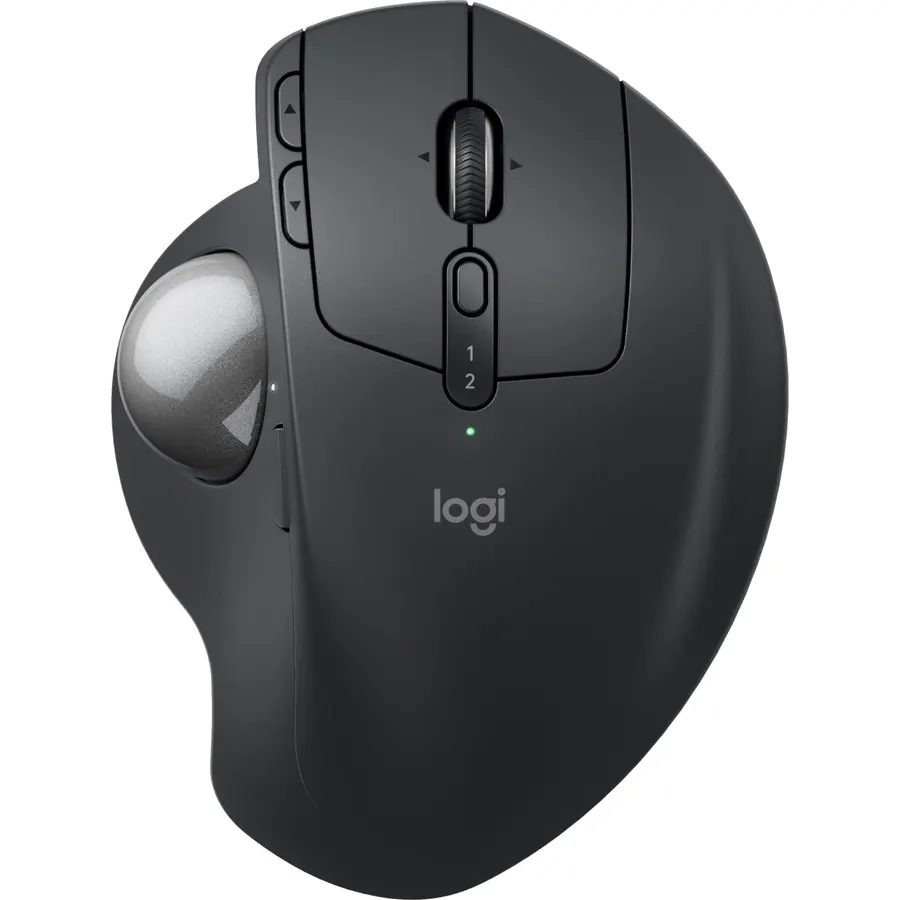
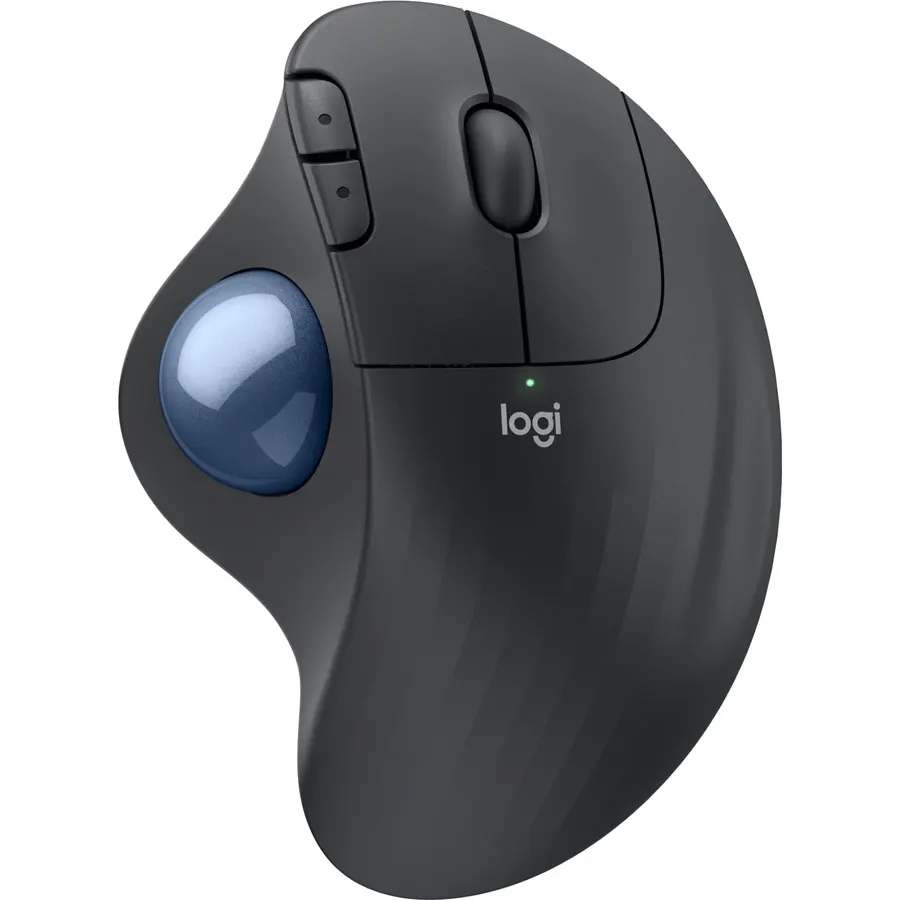
Advanced thumb control: The MX Ergo S Advanced wireless trackball mouse gives more control with less movement; switch between speed and high-precision tracking at the tap of a button
20-degree tilt: A wireless ergonomic mouse with a tilt angle for better forearm posture, reducing muscle strain by 27% (1); now with 80% quieter clicks (5)
Contoured for your hand: The MX Ergo S is certified by ergonomists for improved comfort, with a sculpted ergonomic design, 20-degree tilt angle, and soft rubber grip; for medium- to large-sized hands
Boost your productivity using the Logi Options+ App (2): Experience enhanced control in your daily tasks with 6 customizable buttons, time-saving shortcuts, and Smart Actions
Quick USB-C charging: Enjoy up to 24h of use from a 1 min charge or up to 120 days (3) with a full charge; charges with a USB Type C to Type C or USB Type A to Type C cable (not included)
Dual wireless connectivity: Connect your rechargeable wireless mouse via Bluetooth or Logi Bolt USB receiver (included); supported by an Easy-Switch button
Made with recycled plastic: The plastic parts in the MX Ergo S wireless rechargeable mouse are made of 20% certified post-consumer recycled plastic (4)
Complete your advanced setup: Pair the MX Ergo S with the ERGO K860 ergonomic split-curved keyboard, featuring an integrated cushioned palm rest for all-day comfort
Advanced thumb control: The MX Ergo S Advanced wireless trackball mouse gives more control with less movement; switch between speed and high
Ranked #99 in Mice · 4 things we like
Quick answer The Logitech MX Ergo S Advanced Wireless Trackball scores 9.0/10 with us. Amazon owners rate it 4.5 out of 5 across 813 reviews, in line with the 4.4 average of the 166 products we track in Mice. It was listed at $109.99 on Amazon when we last checked in September 2026. Key facts: connectivity technology Bluetooth, USB, operating system Windows, macOS.
The MX Ergo S is Logitech’s most advanced ergonomic trackball mouse yet, with a 20-degree tilt angle and precise thumb control - user-tested and certified by ergonomists. The MX Ergo S wireless ergonomic mouse is sculpted to fit the palm of your hand while keeping it relaxed, and it tilts 20 degrees for 27% less muscle activity in the forearm (1), providing elevated comfort throughout your day. Work faster with 6 customizable buttons and a DPI button to effortlessly switch between speed and high-precision tracking.
Now with 80% quieter clicks (5). For even more control that's tailored to your needs, assign time-saving shortcuts and Smart Actions using the Logi Options+ App (2). Connect your wireless mouse to 2 devices via Bluetooth or the included Logi Bolt receiver and switch between devices with the Easy-Switch button.
Charge the rechargeable mouse with a USB Type C to Type C or USB Ty
Do Best Deal is a participant in the Amazon Services LLC Associates Program. As an Amazon Associate we earn from qualifying purchases. If you buy through links on this site we may earn a commission, at no extra cost to you. Learn more.
Advanced thumb control: The MX Ergo S Advanced wireless trackball mouse gives more control with less movement; switch between speed and high-precision tracking at the tap of a button
20-degree tilt: A wireless ergonomic mouse with a tilt angle for better forearm posture, reducing muscle strain by 27% (1); now with 80% quieter clicks (5)
Contoured for your hand: The MX Ergo S is certified by ergonomists for improved comfort, with a sculpted ergonomic design, 20-degree tilt angle, and soft rubber grip; for medium- to large-sized hands
Boost your productivity using the Logi Options+ App (2): Experience enhanced control in your daily tasks with 6 customizable buttons, time-saving shortcuts, and Smart Actions
Logitech MX Ergo S Advanced Wireless Trackball: questions & answers
Is the Logitech MX Ergo S Advanced Wireless Trackball worth buying?
Yes, it is one of the stronger picks in its group. We score the Logitech MX Ergo S Advanced Wireless Trackball 9.0 out of 10. Amazon owners rate it 4.5 out of 5 across 813 reviews, in line with the 4.4 average of the 166 products we track in Mice.
How much does the Logitech MX Ergo S Advanced Wireless Trackball cost?
It was listed at $109.99 on Amazon when we last checked in September 2026. Amazon prices change daily, so use the price button on this page to see the current figure.
What are good alternatives to the Logitech MX Ergo S Advanced Wireless Trackball?
Similar, well-rated products in our catalog: Logitech Ergo M575S Wireless Bluetooth (8.8/10, 4.4 stars from 2,293 owners); Logitech MX Master 3S (9.0/10, 4.5 stars from 958 owners); Logitech Trackman Marble Trackball Mouse (9.2/10, 4.6 stars from 12,009 owners).
Breakdown from the 10 most helpful reviews we imported.
N
Nick's Take
Verified purchaseFebruary 22, 2026
A Trackball That Solved My Wrist & Shoulder Pain — and Changed How I Use a Mouse
Nick’s Take (The short story)This was my first trackball mouse, purchased to help resolve wrist and shoulder strain — and it genuinely delivered.After 10 months of daily use, I now prefer it over a traditional mouse. Comfortable, precise, thoughtfully designed, and worth the price if ergonomics matter to you.1. Context & Use CaseThis is my first-ever trackball mouse. I purchased it specifically to address wrist and shoulder discomfort that developed from long hours at my desk.At the time, I was using a Microsoft Sculpt keyboard, and now a Kinesis MWave, both aimed at improving ergonomics. The
S
S
Verified purchaseJanuary 31, 2026
This Trackball Saved My Wrist and Changed How I Work at My Desk
This Logitech MX Ergo S trackball is ergonomically designed with an adjustable angle and I am not going to lie, it eliminated my wrist pain within days of switching. No more moving my whole arm around to use the mouse. Just thumb control of the trackball while my hand stays in a natural position.The adjustable tilt lets you customize the angle from flat to 20 degrees. I use it at the higher angle which keeps my wrist in a neutral position. The difference in comfort compared to a traditional mouse is dramatic. My forearm is no longer pronated all day long.Precision tracking is excellent. The tr
P
PNW Keith
Verified purchaseJune 8, 2026
Best trackball mouse out there. No more sore wrists!
Best trackball mouse I've ever used. I especially like the ability to switch between multiple PCs conveniently. I used to get carpel tunnel really bad when using a traditional mouse. Since switching to the Logitech MX Ergo S, no more sore wrists! Cleaning the internal contact points is super easy and restores smooth operation in seconds. Button clicks have a premium feel with low noise and relatively short travel. The metal baseplate ensures it stays put and grips the desktop surface so you can enjoy hours of use without it sliding all over the place. Highly recommend and will buy again if thi
M
mattbytes
Verified purchaseMay 2, 2025
Good update to an already great trackball
I've been really pleased with the Logitech MX Ergo S trackball mouse. Having used the previous version with its older micro USB port, this upgrade brings some nice improvements to an already excellent mouse.The USB-C charging is a welcome change that makes charging more convenient. A quick 1-minute charge gives you 24 hours of use, and when fully charged it lasts up to 120 days Amazon – so battery life is rarely a concern.The quieter clicks are a noticeable improvement that makes the mouse more pleasant to use, especially in shared spaces. Logitech has made the main buttons 80% quieter than th
B
B Farkas
Verified purchaseJuly 14, 2026
Excellent trackball, but connectivity issues cost it one star
I've been using Logitech trackballs since their very first model in the 1990s. I've always preferred them, and although the M570 and Ergo M575 had switch failures back in the early 2020s, I was encouraged by recent reviews saying the quality had returned. I bought the MX Ergo S in February and immediately loved the comfort and control — it was a clear upgrade from my MX Master 3 Advanced Wireless mouse; my wrist is no longer cramping, and my desktop is no longer too small.Recently, I upgraded to a Lenovo ThinkPad P16 and paired the MX Ergo S over Bluetooth. Most of the time it works well, but
S
Samantha
Verified purchaseApril 4, 2026
Quality Mouse & Saves my Wrist
Bought this to replace one of the older models of the same trackball I misplaced. I was initially sad to see the price increased on this model from the one I purchased a few years ago, but I can tell the quality has improved so I'm happy with the cost knowing now quality improvements were made. In my experience, this specific trackball is durable and my last one lasted me over 2 years with heavy use; it stills works, was just misplaced.Overall, I love this mouse. The tilt on it is so nice for my hand and my wrists. I work in IT but also do digital artwork and graphic design as a secondary job
J
Joshua
Verified purchaseJanuary 2, 2025
Much needed refresh of a great mouse
TL'DR:- USB-C Charging :pray:- Highly customizable (with Logitech+ software)- very comfortable- high quality build- Wish the scroll wheel was quieter- would like a built in receptacles for dongleBeen using the predecessor MX Ergo for about the last 5 years. It is a wonderful mouse and much of what I loved of this mouse can be found on the predecessor. When comparing the previous version and this latest version the only discernible differences to someone who uses their mouse for 8+ hours a day are: usb-c charging, silent mouse clicks.If you dont mind micro-usb charging and a louder mouse click
M
MK
Verified purchaseNovember 7, 2025
NO SMOOTH SCROLLING - RATCHET ONLY - Update -workaround
I have several Logitech MX Master mice. Love them. I Just bought this MX Ergo S and am debating returning it. It's actually a great mouse, except that it has no smooth scrolling, only the outdated ratcheting wheel. It takes forever to scroll a long web page up or down.I'm not sure why Logitech decided to exclude the hyperspeed smooth scrolling from their trackball mice. It's a braindead idea, and I'm sure there are lots of returns occurring for that reason alone. This would have gotten 5 stars if not for that bit of idiocy. A $130 dollar mouse that's mostly useless for web browsers or long doc
Customer reviews are shown as published on Amazon and are not written by Do Best Deal.
More mice we compared
Alternatives to the Logitech MX Ergo S Advanced Wireless Trackball