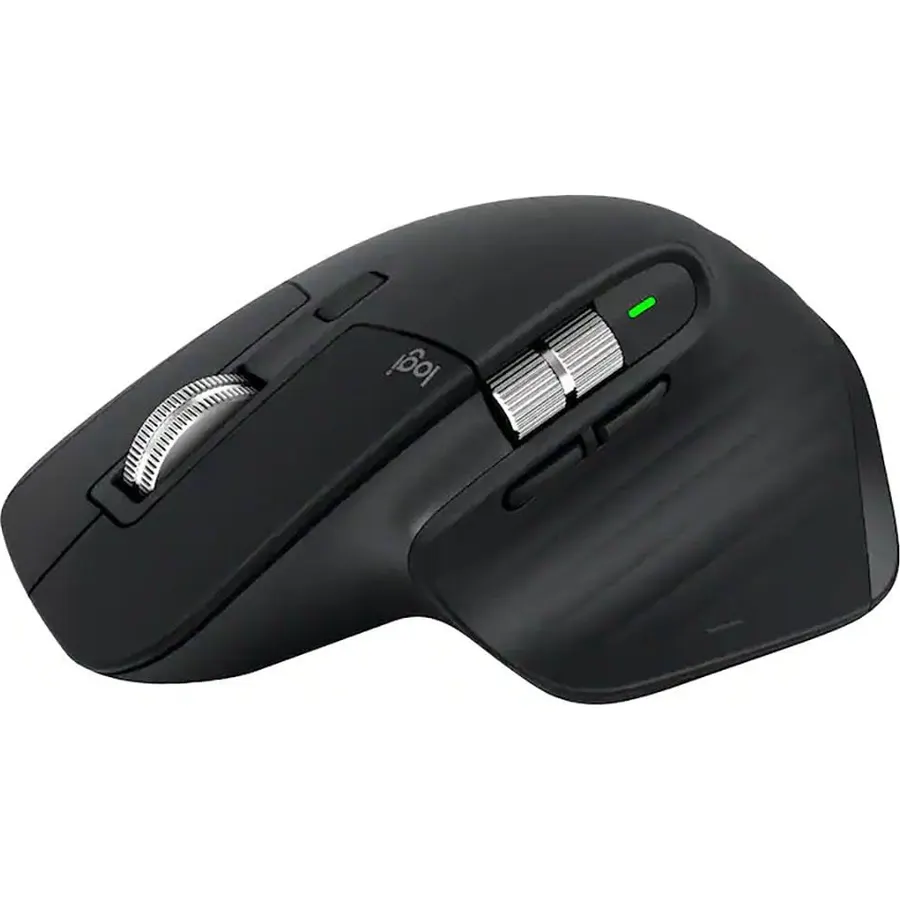
Any-surface tracking - now 8K DPI: Use MX Master 3S cordless computer mouse to work on any surface - even glass - with the upgraded 8000 DPI
About this item
Any-surface tracking - now 8K DPI: Use MX Master 3S cordless computer mouse to work on any surface - even glass - with the upgraded 8000 DPI sensor with customizable sensitivity
Introducing quiet clicks: MX Master 3S Bluetooth mouse introduces Quiet Clicks - offering the same satisfying feel but with 90% less click noise
Magspeed scrolling: A computer mouse with remarkable speed, precision, and near silence - MagSpeed scrolling is 90% faster, 87% more precise, and ultra quiet
Ergonomic design: Work comfortably with a precision mouse featuring a silhouette crafted for a more natural wrist posture and optimally placed thumb controls
Upgraded customization software: Customize buttons and optimize your workflow with App specific profiles in the improved Logi Options+
FLOW cross-computer control: Work seamlessly on multiple computers or laptops, and transfer text, images, and files - between Windows & macOS
Multi-device and multi-OS: Connect the comfort mouse with up to 3 devices via Bluetooth or the included Logi Bolt USB receiver on Windows, macOS, Chrome OS or Linux
Plastic parts in MX Master 3S include certified post consumer recycled plastic (Black: 27%, Pale Gray: 22%(10). Certified carbon neutral.
Any-surface tracking - now 8K DPI: Use MX Master 3S cordless computer mouse to work on any surface - even glass - with the upgraded 8000 DPI
Ranked #99 in Mice · 4 things we like
Quick answer The Logitech MX Master 3S scores 9.0/10 with us. Amazon owners rate it 4.5 out of 5 across 958 reviews, in line with the 4.4 average of the 166 products we track in Mice.
Introducing Logitech MX Master 3S - an iconic mouse remastered for ultimate tactility, performance, and flow. Quiet Click buttons deliver a satisfying tactile feel with 90% less click noise. MX Master 3S also now comes with an 8K optical sensor for next-gen responsiveness on any surface - even glass.
MagSpeed electromagnetic scrolling delivers remarkable speed, precision, and near silence - with the ability to scroll 1,000 lines a second. The ergonomic silhouette is crafted to support your palm and fingers. Logi Options+ enables Flow cross-computer control and introduces more customizations than ever.
MX Master 3S stays powered up to 70 days on a full charge - and delivers three hours of use from a one minute quick charge.
Do Best Deal is a participant in the Amazon Services LLC Associates Program. As an Amazon Associate we earn from qualifying purchases. If you buy through links on this site we may earn a commission, at no extra cost to you. Learn more.
Product information
24 specifications
Additional Features
8000 dpi Darkfield Optical Sensor; MagSpeed Electromagnetic Scrolling, Quiet Click Buttons; Up to 70 Days Battery Life
Antenna Location
Laptop
Brand
Logitech
Button Quantity
5
Color
Black
Compatible Devices
Laptop
Connectivity Technology
Bluetooth, Radio Frequency, USB
Hand Orientation
Ambidextrous
Hardware Platform
Mac, PC
Included Components
Item
Item Dimensions L x W
7"L x 5.4"W
Item Type Name
Mouse
Item Weight
4.96 ounces
Mfr Part Number
910-006556
Model Name
MX MASTER 3S
Model Number
910-006556
Mouse Maximum Sensitivity
8000 dots_per_inch
Movement Detection
Optical
Number of Batteries
1 Lithium Polymer batteries required. (included)
Operating System
Chrome OS, Linux, Windows 10
Power Source
Battery Powered
Style Name
Modern
Unit Count
1 Count
Warranty Description
1 year Manufacturer
Pros & cons
What we like
Any-surface tracking - now 8K DPI: Use MX Master 3S cordless computer mouse to work on any surface - even glass - with the upgraded 8000 DPI sensor with customizable sensitivity
Introducing quiet clicks: MX Master 3S Bluetooth mouse introduces Quiet Clicks - offering the same satisfying feel but with 90% less click noise
Magspeed scrolling: A computer mouse with remarkable speed, precision, and near silence - MagSpeed scrolling is 90% faster, 87% more precise, and ultra quiet
Ergonomic design: Work comfortably with a precision mouse featuring a silhouette crafted for a more natural wrist posture and optimally placed thumb controls
What could be better
Logitech MX Master 3S: questions & answers
Is the Logitech MX Master 3S worth buying?
Yes, it is one of the stronger picks in its group. We score the Logitech MX Master 3S 9.0 out of 10. Amazon owners rate it 4.5 out of 5 across 958 reviews, in line with the 4.4 average of the 166 products we track in Mice.
What are good alternatives to the Logitech MX Master 3S?
Similar, well-rated products in our catalog: Logitech MX Master 4 (8.8/10, 4.4 stars from 539 owners); Logitech M535 Bluetooth Mouse (9.2/10, 4.6 stars from 4,391 owners); Logitech MX Anywhere 3 Compact Performance (9.6/10, 4.8 stars from 924 owners).
Breakdown from the 10 most helpful reviews we imported.
L
Luis Injoque
Verified purchaseAugust 16, 2026
Great for excel modeling, and long hours of use in a day
I use excel a lot, for multiple hours per day, and this is just the best. The ability to scroll across, and personalize the buttons is very helpful. Also, the way it charges, pretty much no downtime as you can still use. My wrist feels well after using it, not like other mouses.
C
christian mendez
Verified purchaseSeptember 12, 2025
⭐️⭐️⭐️⭐️⭐️ The Mouse That Makes Every Other Mouse Feel Like a Toy
The MX Master 3S isn’t just a mouse—it’s basically a productivity cheat code. Setup? Easy. Comfort? Like it was sculpted by the gods of ergonomics. That side scroll wheel alone is worth the price—it’s like having a gear shift for editing.For video editing, this thing is a dream. Zipping through timelines, precision dragging, quick shortcuts—it makes me feel faster, smoother, and way more in control. Then when it’s time to switch gears and game? It still holds its own with buttery movement and responsive clicks. Sure, it’s not a dedicated gaming mouse, but it’s like bringing a luxury car to a g
L
Lonnie
Verified purchaseAugust 2, 2025
Perfect mouse - couldn’t ask for better
I’ve been using the MX Master 3S for about 8 months now and this thing is a game-changer. When you’re constantly switching between applications and juggling multiple windows throughout the day, having a mouse that just works flawlessly is crucial.The scroll wheel alone is worth the price - being able to fly through long documents or quickly navigate through pages of content is so much faster than my old mouse. The side scroll wheel is clutch when working with wide spreadsheets or browsing through detailed reports.Battery life is insane - I’m talking months between charges, even with heavy dail
S
Susan York
Verified purchaseMay 25, 2024
Very happy with this mouse!
This mouse has singlehandedly saved my relationship with my Macbook Air.The Macbook was my first laptop. I’ve always had a desktop PC. I’ve heavily used iPhones and iPads, so instead of getting another PC when my old one failed, I decided to get a Mac laptop. I read some reviews that mentioned the track pad on the Macbook was a pain, but I thought “How bad could it be?”Answer: pretty bad! I struggled with scrolling, I struggled with clicking where I wanted to click. It was frustrating enough that I was avoiding using the new laptop as much as possible.This mouse solved all those problems, and
T
TMac
Verified purchaseApril 14, 2025
World's best mouse. Seriously.
This is the world's best mouse for professionals, such as SW developers, content creators, and any power user of a computer. I've owned one for four years. I've bought seven more to give to friends and family as gifts, even though they're pretty expensive. I am now those people's best friend. :)After four years the mouse is still in perfect working order and totally reliable. The battery life time on a full charge has diminished maybe 20% in that time. But it's still over a month per charge for me.I love the fact that the same mouse can talk to three different computers with the switch on the
K
KellyC
Verified purchaseAugust 21, 2024
super comfortable mouse
I got this mouse because I was starting to have a bit of thumb pain at work and it seemed to stem from using a mouse. This mouse has a little shelf your thumb rests on, and it's much more comfortable to use and my thumb doesn't need to be tensed up, so I haven't been having thumb pain lately since getting this. It has lots of shortcut buttons that I make good use of, and I like that I can toggle between a clicky scroll wheel and a smooth one. Side note: that smooth wheel will just go and go, which can cause some problems if I don't remember to stop it before, say, hitting the Ctrl button for a
A
Arthur J Cook
Verified purchaseJuly 9, 2026
The "smart" scroll wheel destroys productivity
At the price point, couldn't be more disappointed in this mouse. The scroll wheel tries to be smart and it "unlocks" when you scroll quickly and "locks" when the scroll slows down. Unlocking and locking cause a temporary lag during which the scroll wheel doesn't actually scroll anymore. How about just let me decide how I want to use my mouse instead of trying to smart and deciding for me, never successfully.The scroll wheel also very frequently simply does not register that I scrolled the wheel. I scroll the wheel and absolutely nothing happens.Additionally, the mouse does not and cannot opera
R
RS
Verified purchaseMay 20, 2026
Very good, but not perfect
One of the better mice out there. I think I finally found a mouse that has zero problems with the mouse wheel after 9 months. That alone justifies buying it for the amount of time I use it for so many uses. They should have used this mouse wheel design many years ago!The pads underneath the mouse could be better. Might have to put some single sided teflon tape there to decrease the friction. Just a minor improvement, especially for gaming.The one thing that kind of annoys me is the length of this mouse. If they chopped off 1/2" from the front, it would be so much better. I am constantly hittin
Customer reviews are shown as published on Amazon and are not written by Do Best Deal.