Many current laptops charge over USB-C, which means the charger no longer has to come from the laptop maker. A second one for the office, a smaller one for the bag or a replacement for a frayed original can be any USB-C Power Delivery charger with enough watts. The one we recommend to most people is the Anker 65W 3-port charger: it delivers 65 W to a single laptop, charges a phone and earbuds from the same block, and has 22,343 owner ratings at 4.7 stars. It suits laptops that shipped with a 45 W or 65 W USB-C adapter.
The “chargers and adapters” shelves of our accessories catalog mix laptop chargers with 12-volt power supplies and phone blocks. We pulled out the USB-C chargers of 65 W and up and chose five for different situations. We did not measure output or heat; the comparison uses each listing’s stated specifications and the owner ratings at the time of writing. Prices change daily, so the buttons open the live Amazon page.
How we picked
- USB-C output of at least 65 W on one port, enough for most thin laptops and Chromebooks.
- Output figures in the listing, so you can check volts and amps against the label on your old adapter.
- Owner ratings of 4.3 stars or higher with more than 1,000 reviews. Replacement laptop chargers in our data mostly sit between 4.2 and 4.6 stars, so the bar is lower than in our keyboard or mouse guides.
- Five situations: an everyday compact charger, a low-cost replacement brick, a 100 W multi-port, a 130 W charger for specific Dell models and a worldwide travel adapter.
The picks
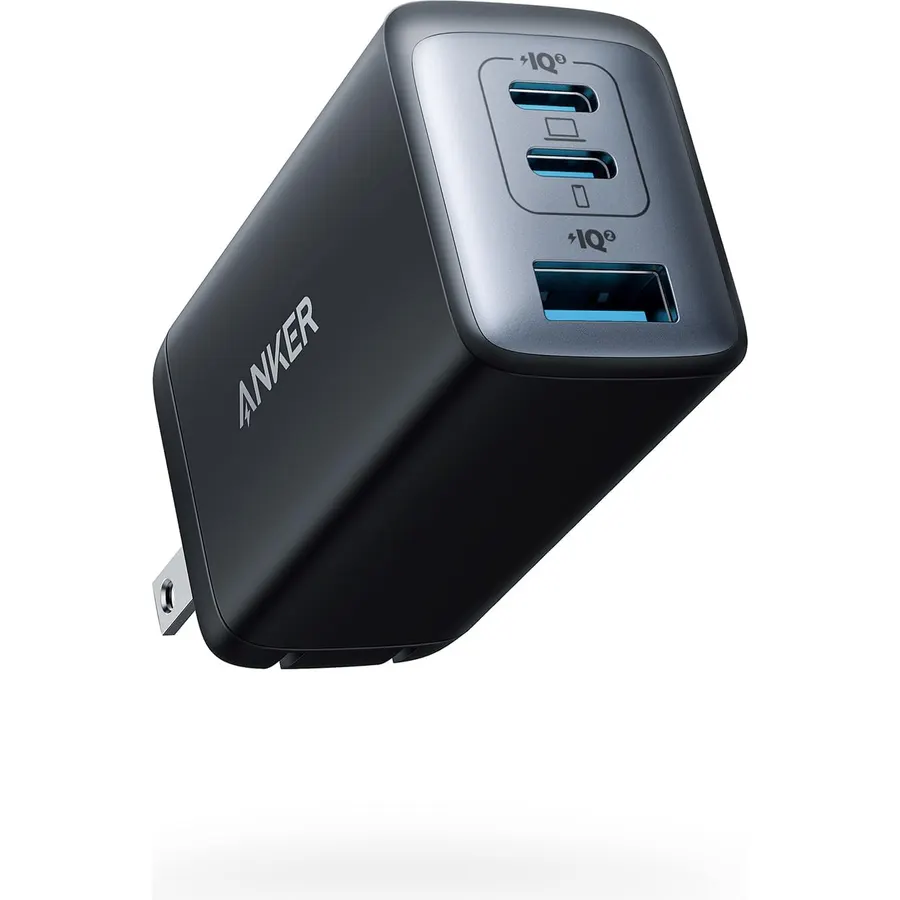
Sold as the Anker 735 or Nano II 65W, this is the charger that replaces the laptop brick, the phone charger and the tablet charger in one bag. With a single device connected it delivers up to 65 W, which Anker says is enough to charge a 2020 13-inch MacBook Pro at full speed. Plug in two or three devices and the power is divided among the ports. GaN II components keep it small, the prongs fold, and the listing names FCC, CE and UL among the standards met. No other laptop-capable charger in our catalog has as many owner reviews. Bring your own USB-C cable.
- 22,343 owner ratings at 4.7 stars, the most and the highest here
- Full 65 W when one device is connected
- Roughly the size of an AirPods Pro case, per Anker
- 18-month warranty stated in the listing
- Power is shared when two or three devices are plugged in
- No cable listed in the box
- Not enough for laptops that need 90 W or more
DJW 65W USB C Laptop Charger Compatible with HP Spectre x360, Envy, Elitebook x360, Pavilion
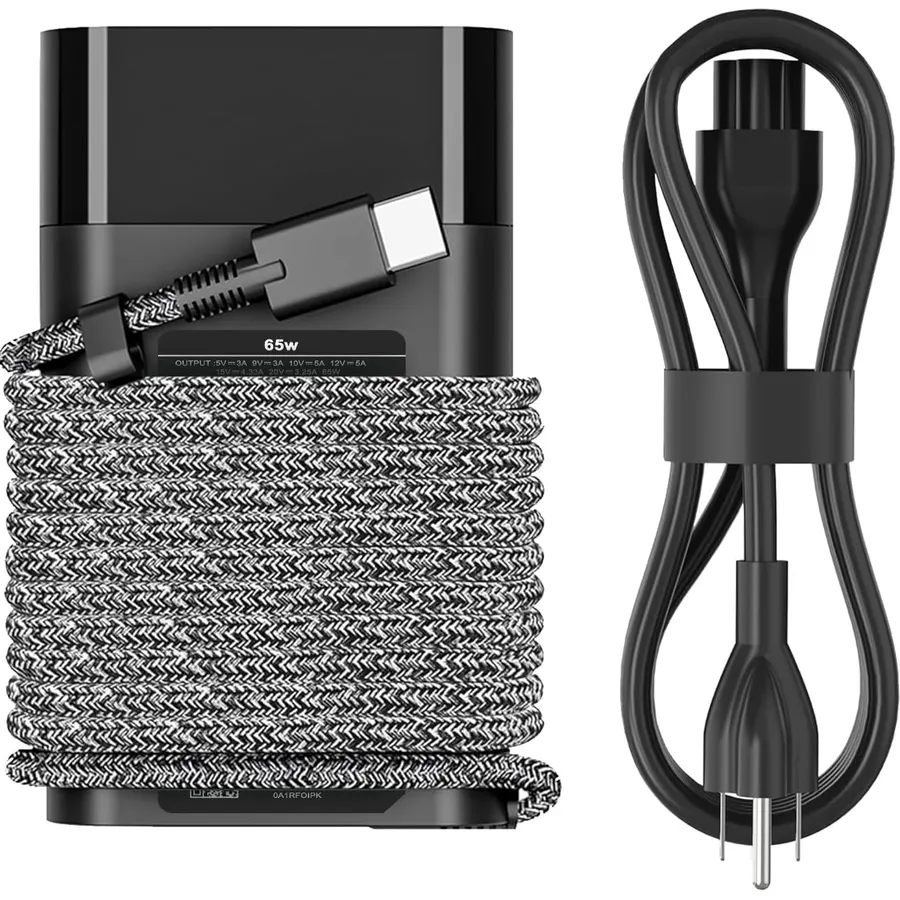
When the original adapter dies, the cheapest sensible fix is a like-for-like replacement: a brick with a power cord. DJW’s 65 W USB-C adapter is listed as compatible with HP Spectre x360, Envy, EliteBook x360, Pavilion, ProBook, ZBook, OmniBook and Chromebook models, and the listing goes on to give dozens of HP part numbers to match against the label on your old charger. Output tops out at 20 volts and 3.25 amps. Owners rate it 4.5 stars across 11,424 reviews. It does one job for one laptop, at about two thirds of the Anker’s price when we checked.
- 11,424 owner ratings at 4.5 stars
- About twenty dollars in our catalog data at the time of writing
- Listing gives long model and part-number lists for HP laptops
- Also described as compatible with HP 45 W USB-C chargers
- One device at a time
- A brick with a separate power cord, not a pocket-size wall charger
- Listing names CE and FCC only; no UL or ETL mark in our data
Amazon Basics 100W Four-Port GaN Wall Charger with 2 USB-C (100W, 18W) & 2 USB-A Ports (12W)
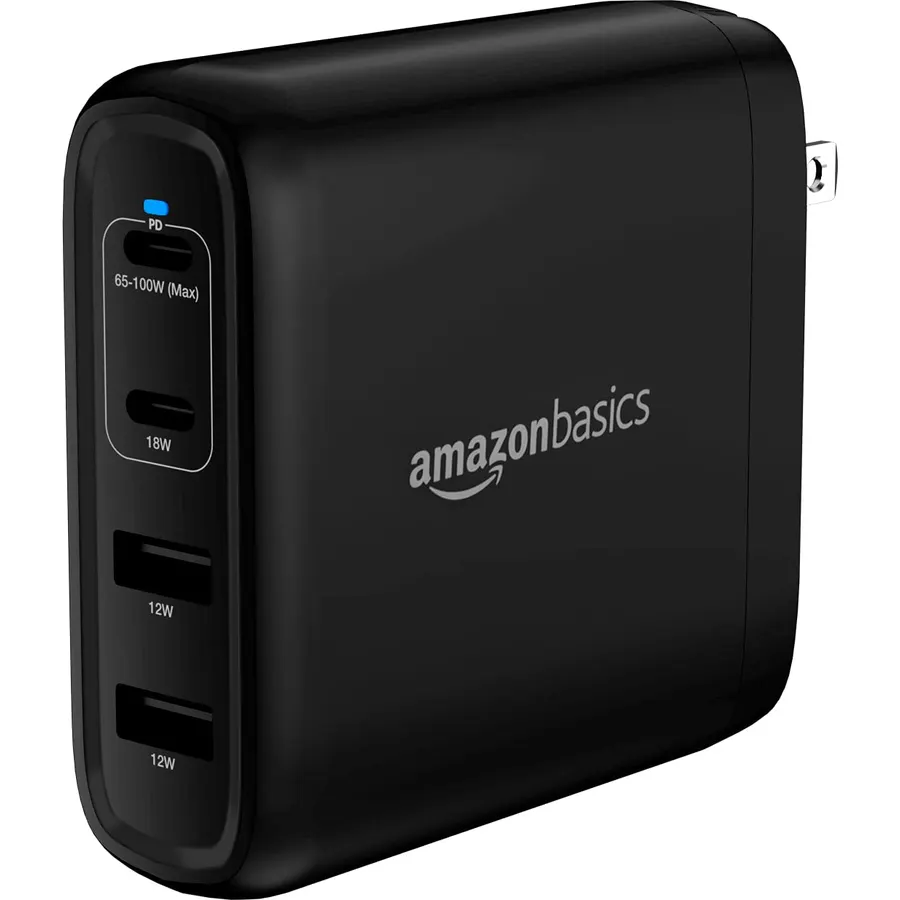
Laptops with larger batteries and faster processors often ship with 90 W or 100 W adapters, and a 65 W charger will only keep up with them slowly. This Amazon Basics charger puts 100 W through its first USB-C port when that port is used alone. Fill all four ports and it still reserves 65 W for the laptop, with 18 W on the second USB-C port and 17 W shared by the two USB-A ports. The listing is frank about one limit: there is no PPS support, so Samsung and Google Pixel phones charge at 9 volts and will not reach their fastest modes.
- 100 W from a single USB-C port for larger laptops
- Still gives the laptop 65 W with all four ports busy
- Per-port outputs are spelled out in the listing
- Foldable plug and GaN components
- 4.3 stars from 1,052 owners, the lowest rating here with the PIOEVTKA
- No PPS, so Samsung and Pixel phones will not reach their fastest charging mode
- No cable listed in the box, and 100 W needs a cable rated for 5 A
PIOEVTKA 130W USB C Type C Adapter Laptop Charger Compatible with Dell XPS 15
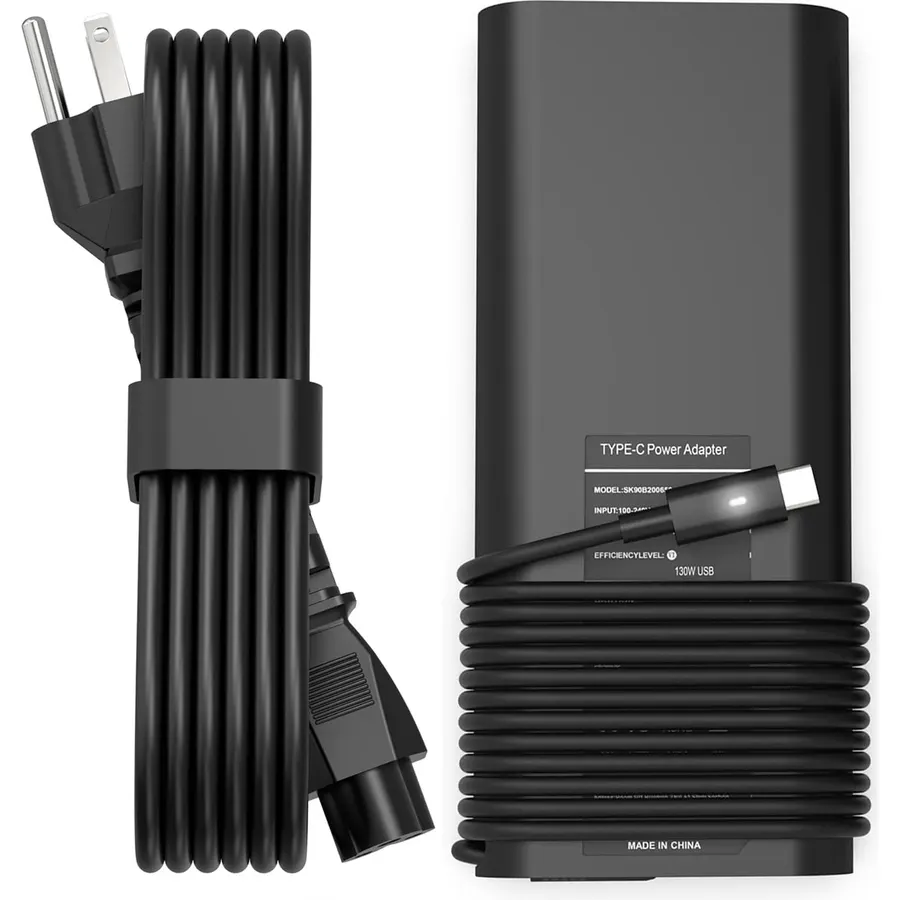
Some Dell XPS and Precision laptops use a 130 W USB-C adapter, more than the 100 W that general-purpose chargers in this guide supply. PIOEVTKA’s replacement is built for those machines: 20 volts at up to 6.5 amps, with the XPS 15 9500 and 9575 2-in-1, XPS 17 9700, Precision 5550 and 5750 and a run of Latitude models named in the listing, plus Dell part numbers such as DA130PM170. The seller itself tells buyers to confirm the specifications on their existing adapter before ordering, and so do we. We would not buy it for a non-Dell laptop; nothing in the data says it will deliver 130 W to one.
- Matches the 130 W output that certain Dell laptops ask for
- 2,546 owner ratings at 4.3 stars
- Listing gives Dell model numbers and Dell part numbers to check against
- Costs about the same as the Anker when we checked
- Only worth buying for the Dell models it lists
- No safety certification is named in the listing data we hold
- Rated 4.3 stars, below the Anker and DJW
MOMAX 70W GaN Universal Travel Adapter, All-in-One Travel Charging
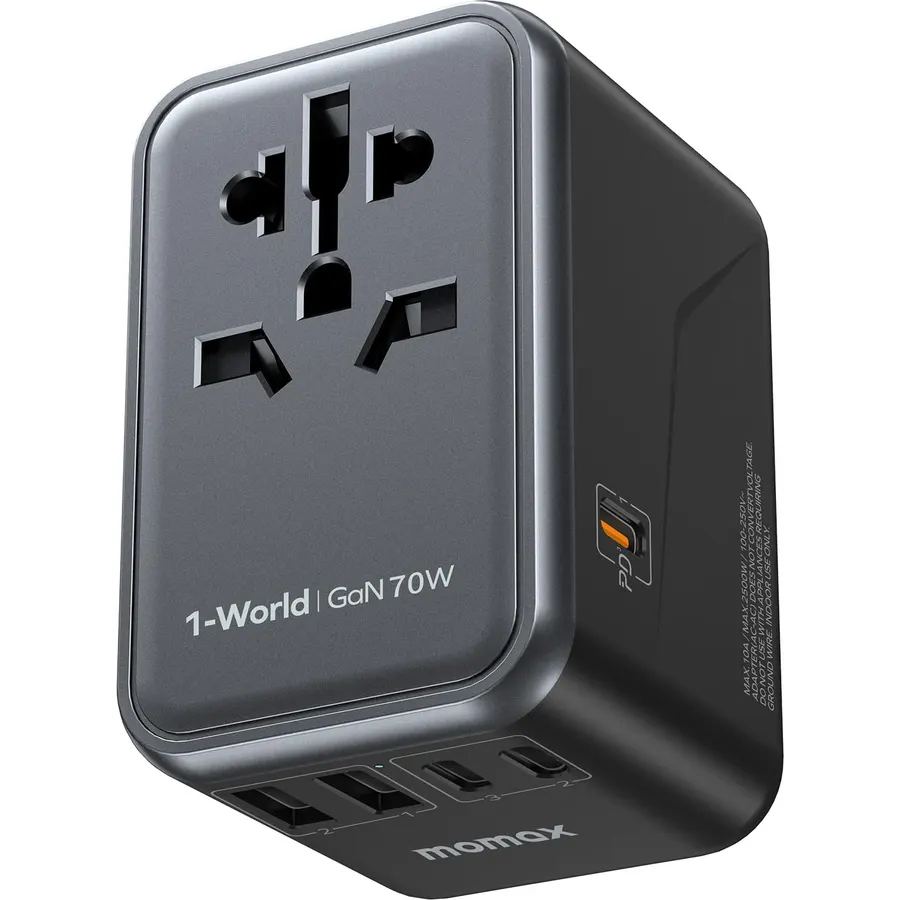
Abroad, a laptop charger needs two things: a plug that fits the wall and enough watts. The MOMAX does both. It has US, UK, EU and Australian plug types built in, and the first USB-C port supplies up to 70 W on its own, which MOMAX describes as meeting the needs of 65 W laptops. Four more USB ports and a universal AC outlet handle everything else, with power shared when several USB ports are busy. The warnings in the listing matter: it does not convert voltage, so anything plugged into the AC outlet must be rated for the local supply, the outlet is limited to 1,100 W on a 110 V supply or 2,500 W on 250 V, and MOMAX states plainly that it has no surge protection. One owner forgot, plugged in a hair dryer abroad and burned out its heating element within minutes. Owners who have used it in Europe and the Middle East rate it 4.6 stars across 2,137 reviews.
- One block is both the plug adapter and the laptop charger
- 4.6 stars from 2,137 owners
- 70 W USB-C output covers laptops that need 65 W
- Built-in 10 A dual fuse; listing names FCC and UL among its certifications
- Does not convert voltage; it only adapts the plug shape
- No surge protection, per the listing
- At 6.35 oz it is more than you need if you never leave the country
Compare the picks
| Product | Max USB-C output | Ports | Style | Owner rating | Our score | |
|---|---|---|---|---|---|---|
| Anker 65W Max 3-PortAnker | 65 W | 3 USB | Compact wall charger | 4.7 / 22.3k+ | 9.4 | See price |
| DJW 65W USB C Laptop ChargerDJW | 65 W | 1 USB-C | Brick with power cord | 4.5 / 11.4k+ | 9.0 | See price |
| Amazon Basics 100W GaNAmazon Basics | 100 W | 2 USB-C + 2 USB-A | Wall charger | 4.3 / 1k+ | 8.6 | See price |
| PIOEVTKA 130W for DellPIOEVTKA | 130 W | 1 USB-C | Brick with power cord | 4.3 / 2.5k+ | 8.6 | See price |
| MOMAX 70W Travel AdapterMOMAX | 70 W | 3 USB-C + 2 USB-A + AC | Worldwide plug adapter | 4.6 / 2.1k+ | 9.2 | See price |
How many watts does your laptop need?
Read the fine print on the adapter that came with the laptop. It lists outputs such as 20V 3.25A; multiply volts by amps and you have the wattage, 65 W in that case.
- The same wattage or more is the safe choice. With USB Power Delivery the laptop and charger agree on a voltage and the laptop draws only what it needs, so a 100 W charger will not overfeed a 45 W laptop.
- Less wattage usually still charges, but slowly, and a laptop working hard may drain its battery while plugged in. Some laptops show a slow-charger warning.
- Above 100 W is where things stop being universal. The 130 W Dell arrangement in this guide is specific to the models named in that listing.
If you also want ports for a monitor and keyboard, a dock can charge the laptop through the same cable; see our USB-C dock and hub guide.
Cables, ports and other details that matter
The cable sets the limit. The Anker and Amazon Basics chargers list no cable in the box. An ordinary USB-C cable carries up to 60 W. For 100 W you need a cable marked for 5 amps or 100 W; with a lesser cable the charger will hold back.
Total watts are not per-port watts. A multi-port charger divides its output. Look for the single-port figure and the figure with everything plugged in, as the Amazon Basics listing provides.
PPS is a fast-charging method used by recent Samsung and Pixel phones. It does not matter for laptops, but it does if the same charger will fill your phone.
Safety marks. A charger sits on mains voltage next to an expensive battery. Prefer listings that name a recognized test mark: the Anker lists UL, the MOMAX lists UL and FCC, the DJW lists CE and FCC, and the Amazon Basics and PIOEVTKA listings in our data name none. Use a charger on a hard surface where it can shed heat, not under a pillow or in a closed bag, and stop using any adapter that runs unusually hot or has a damaged cable or a cracked case. Your laptop maker’s guidance on third-party chargers takes priority over ours.
Shopping for the laptop itself? Start with our college laptop guide, which also suggests keeping a 65 W USB-C charger in the bag.
Can I use a charger with more watts than my laptop came with?
With USB-C Power Delivery, yes in general: the laptop requests the power it needs and the charger supplies no more than that. Check your laptop manual if the maker says otherwise.
Do these chargers come with a USB-C cable?
The Anker and Amazon Basics listings do not include one in the box contents. The DJW is an adapter supplied with an AC power cable, in the style of an original laptop charger. Check the box contents on the live listing before you order.
Does the MOMAX travel adapter convert voltage?
No. It changes the plug shape only. Laptop and phone chargers are normally rated 100 to 240 volts, so they are fine, but a single-voltage hair dryer or heater must not be used through it abroad.
Will a third-party charger harm my laptop?
A charger that follows the USB Power Delivery standard should not, but quality varies. We favor listings that name safety certifications: the Anker lists UL, and the MOMAX lists UL and FCC. A 65 W USB-C adapter sold under the Dell brand is also in our catalog, though owners rate it 4.0 stars over 906 reviews.
Bottom line
For a laptop that needs 65 W or less, buy the Anker 65W Max 3-Port and a good cable. Choose the DJW for a low-cost spare brick for an HP, the Amazon Basics 100W for a higher-powered laptop plus phones, the PIOEVTKA only for the 130 W Dell models it lists, and the MOMAX if the charger has to work abroad.
Prices and stock change daily. The buttons above open Amazon so you always see the current price. We may earn a commission if you buy through them, at no extra cost to you.
Do Best Deal is a participant in the Amazon Services LLC Associates Program. As an Amazon Associate we earn from qualifying purchases. If you buy through links on this site we may earn a commission, at no extra cost to you. Learn more.