16 Versatile Connection Ports: All-in-one Acer docking station built for multi-screen office workflows, equipped with dual HDMI 2.0, dual DP
Total HDMI Ports2Total USB Ports5
About this item
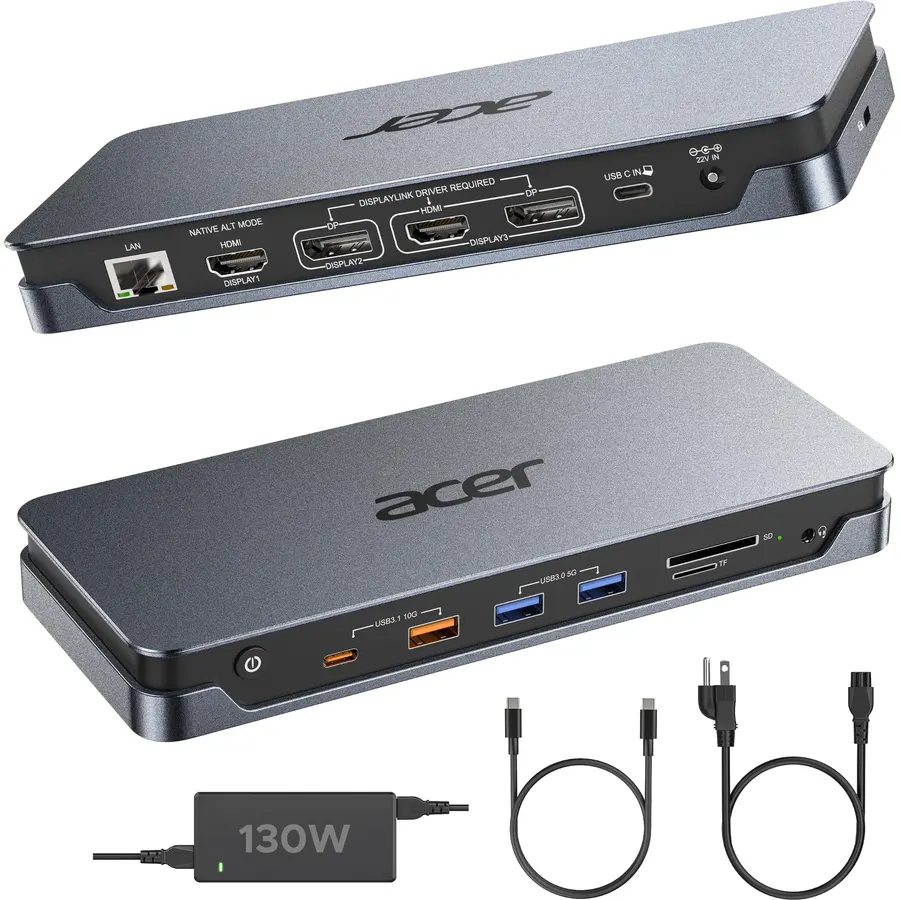
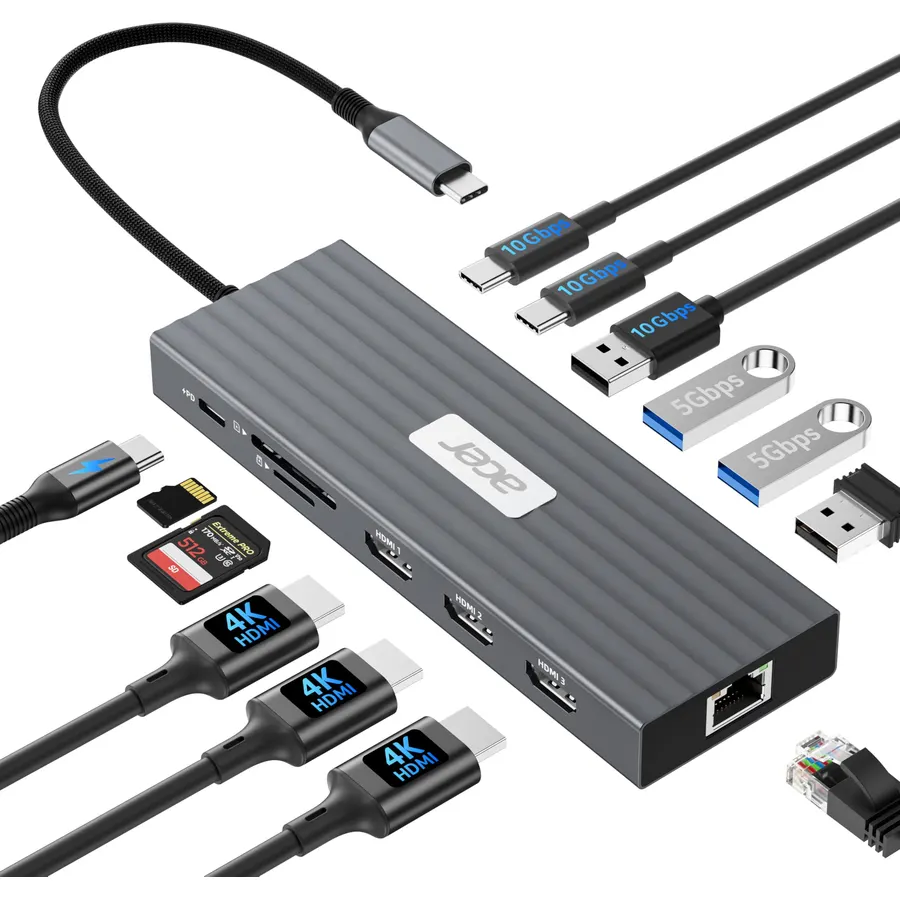
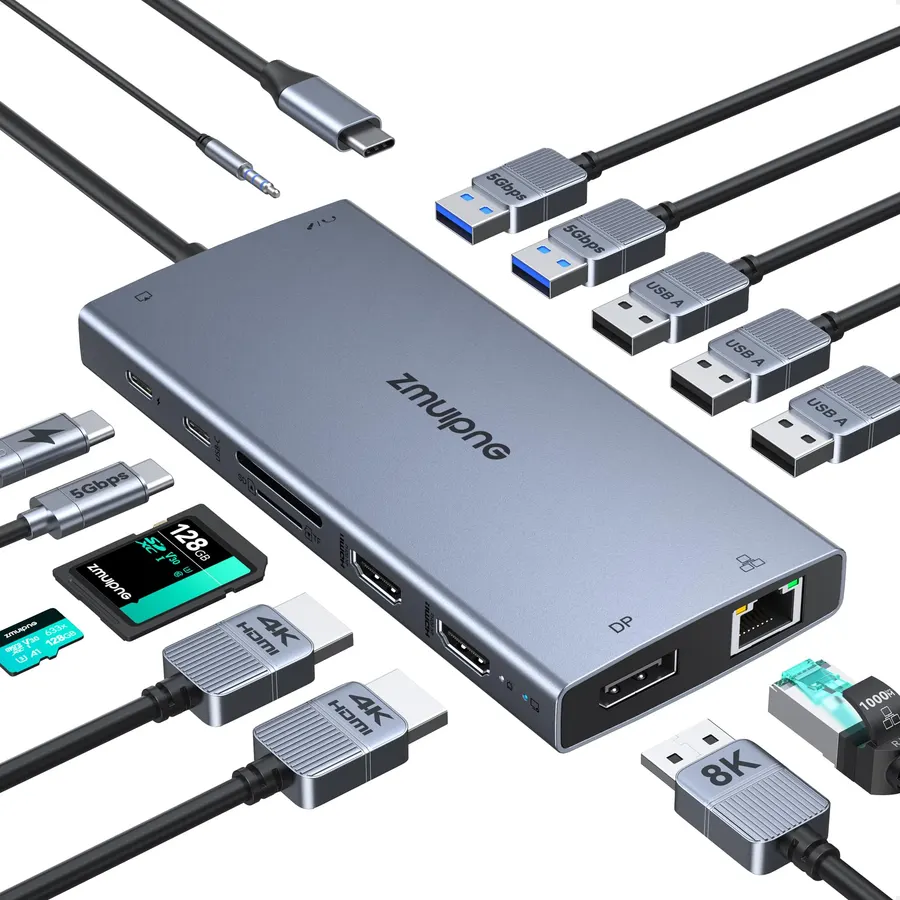
16 Versatile Connection Ports: All-in-one Acer docking station built for multi-screen office workflows, equipped with dual HDMI 2.0, dual DP 1.2 (DP2 & HDMI2 share one signal channel), 2× 5Gbps USB A 3.1 Port, 1× 10Gbps USB-A Port, 1× 10Gbps USB-C Port, 1× 1Gbps Ethernet, SD/TF dual card reader, and 3.5mm audio combo jack. Comes with original 130W power adapter & USB4 40Gbps cable for stable full-load operation. (Tip: Plug wireless mouse/keyboard receivers into 5Gbps blue-core USB ports to avoid 2.4GHz interference with high-speed SSDs; always use the included original cable. Active DP-to-HDMI adapters are required if converting DP signals.)
Seamless Triple Display Expansion: Build a powerful command center. This Acer docking station supports three independent screens (2x HDMI + 1x DP or 2x DP + 1 HDMI) for macOS and Windows laptops. Multitask like a pro—extend your financial charts, code, and research across all monitors to boost productivity. DP ports deliver smoother rendering when mixing 4K main screens and 2K secondary monitors. (Note: Official DisplayLink driver installation is mandatory for full triple-screen functionality; only the native HDMI1 port works without drivers. macOS 10.13 and older systems support a maximum of 2 external screens only.)
130W Power Adapter Included:The included 130W power adapter delivers robust 100W of power directly to your laptop through the USB-C PD host port, ensuring it stays charged even under the heaviest workloads. This sustained power is essential for reliably running a triple-monitor setup without performance drops. For the optimal experience, we recommend using the included 130W adapter and Type-C cable to unlock the full potential of your docking station. 𝑵𝒐𝒕𝒆: 𝑻𝒉𝒆 100 𝑾 𝑷𝑫 𝒑𝒐𝒘𝒆𝒓 𝒊𝒔 𝒐𝒏𝒍𝒚 𝒇𝒐𝒓 𝒄𝒉𝒂𝒓𝒈𝒊𝒏𝒈 𝒚𝒐𝒖𝒓 𝒉𝒐𝒔𝒕 𝒍𝒂𝒑𝒕𝒐𝒑. 𝑰𝒕 𝒄𝒂𝒏𝒏𝒐𝒕 𝒔𝒖𝒑𝒑𝒍𝒚 𝒑𝒐𝒘𝒆𝒓 𝒕𝒐 𝒆𝒙𝒕𝒆𝒓𝒏𝒂𝒍 𝒎𝒐𝒏𝒊𝒕𝒐𝒓𝒔 𝒐𝒓 𝒑𝒐𝒘𝒆𝒓-𝒉𝒖𝒏𝒈𝒓𝒚 𝒑𝒆𝒓𝒊𝒑𝒉𝒆𝒓𝒂𝒍𝒔.
Wide System Compatibility & Easy Driver Setup: Works with Windows 10/11 & macOS 10.14+. quick start guide; full setup steps in manual & quick start guide. (Mac Privacy Tip: macOS needs screen recording permission for external display signal transmission. No screen data is captured, saved or uploaded. Stable triple 4K output requires macOS 13.5+; 10.11–13.4 supports max 2 monitors only.) Optimized for office & web use, not ideal for heavy gaming. (Quick Tips: 1.Not compatible with Linux, ChromeOS, iPads, Android tablets or phones; 2.Skip unneeded driver updates — new versions may bring unpatched display bugs.)
Complete Package & Reliable After-Sales Support: Package includes Acer Premium 16-in-1 DisplayLink docking station, original 130W AC power adapter, USB4 40Gbps cable, user manual and quick start guide. Our professional technical support team provides lifetime troubleshooting assistance.
Global DisplayLink Driver Note: Due to DisplayLink hardware DRM limitations, HDCP-protected streaming platforms (Netflix, Prime Video, Disney+, Hulu etc.) will show black screen with audio only when playing videos. To resolve browser streaming issues, turn off hardware acceleration in your browser’s settings.
16 Versatile Connection Ports: All-in-one Acer docking station built for multi-screen office workflows, equipped with dual HDMI 2.0, dual DP
Ranked #99 in Accessories · 4 things we like
Quick answer The Acer 16-in-1 DisplayLink Docking Station scores 9.2/10 with us. Amazon owners rate it 4.6 out of 5 across 23 reviews, above the 4.3 average of the 7 docking stations we track. It was listed at $199.99 on Amazon when we last checked in September 2026. Key facts: total hdmi ports 2, total usb ports 5.
16 Versatile Connection Ports: All-in-one Acer docking station built for multi-screen office workflows, equipped with dual HDMI 2.0, dual DP 1.2 (DP2 & HDMI2 share one signal channel), 2× 5Gbps USB A 3.1 Port, 1× 10Gbps USB-A Port, 1× 10Gbps USB-C Port, 1× 1Gbps Ethernet, SD/TF dual card reader, and 3.5mm audio combo jack. Comes with original 130W power adapter & USB4 40Gbps cable for stable full-load operation. (Tip: Plug wireless mouse/keyboard receivers into 5Gbps blue-core USB ports to avoid 2.4GHz interference with high-speed SSDs; always use the included original cable.
Active DP-to-HDMI adapters are required if converting DP signals.) Seamless Triple Display Expansion: Build a powerful command center. This Acer docking station supports three independent screens (2x HDMI + 1x DP or 2x DP + 1 HDMI) for macOS and Windows laptops. Multitask like a pro—extend your financial charts, cod
Do Best Deal is a participant in the Amazon Services LLC Associates Program. As an Amazon Associate we earn from qualifying purchases. If you buy through links on this site we may earn a commission, at no extra cost to you. Learn more.
3.5mm Audio, DisplayPort, Ethernet, HDMI, SDHC, USB 3.1 Type A, USB 3.1 Type C
Item Highlight
USB-C Dock for Mac & Windows, 3-Monitor Support(2 HDMI+1 DP or 2 DP+1 HDMI), 10Gbps USB A/C, LAN, DisplayLink Driver Req
Minimum Required Operating System Version
Mac OS 10.13 High Sierra, Windows 10
Number of Items
1
Number of Ports
16
Total HDMI Ports
2
Total Number of HDMI Ports
2
Total USB Ports
5
Warranty Description
18-Month Warranty
Wattage
130 watts
Pros & cons
What we like
16 Versatile Connection Ports: All-in-one Acer docking station built for multi-screen office workflows, equipped with dual HDMI 2.0, dual DP 1.2 (DP2 & HDMI2 share one signal channel), 2× 5Gbps USB A 3.1 Port, 1× 10Gbps USB-A Port, 1× 10Gbps USB-C Port, 1× 1Gbps Ethernet, SD/TF dual card reader, and 3.5mm audio combo jack. Comes with original 130W power adapter & USB4 40Gbps cable for stable full-load operation. (Tip: Plug wireless mouse/keyboard receivers into 5Gbps blue-core USB ports to avoid 2.4GHz interference with high-speed SSDs; always use the included original cable. Active DP-to-HDMI adapters are required if converting DP signals.)
Seamless Triple Display Expansion: Build a powerful command center. This Acer docking station supports three independent screens (2x HDMI + 1x DP or 2x DP + 1 HDMI) for macOS and Windows laptops. Multitask like a pro—extend your financial charts, code, and research across all monitors to boost productivity. DP ports deliver smoother rendering when mixing 4K main screens and 2K secondary monitors. (Note: Official DisplayLink driver installation is mandatory for full triple-screen functionality; only the native HDMI1 port works without drivers. macOS 10.13 and older systems support a maximum of 2 external screens only.)
130W Power Adapter Included:The included 130W power adapter delivers robust 100W of power directly to your laptop through the USB-C PD host port, ensuring it stays charged even under the heaviest workloads. This sustained power is essential for reliably running a triple-monitor setup without performance drops. For the optimal experience, we recommend using the included 130W adapter and Type-C cable to unlock the full potential of your docking station. 𝑵𝒐𝒕𝒆: 𝑻𝒉𝒆 100 𝑾 𝑷𝑫 𝒑𝒐𝒘𝒆𝒓 𝒊𝒔 𝒐𝒏𝒍𝒚 𝒇𝒐𝒓 𝒄𝒉𝒂𝒓𝒈𝒊𝒏𝒈 𝒚𝒐𝒖𝒓 𝒉𝒐𝒔𝒕 𝒍𝒂𝒑𝒕𝒐𝒑. 𝑰𝒕 𝒄𝒂𝒏𝒏𝒐𝒕 𝒔𝒖𝒑𝒑𝒍𝒚 𝒑𝒐𝒘𝒆𝒓 𝒕𝒐 𝒆𝒙𝒕𝒆𝒓𝒏𝒂𝒍 𝒎𝒐𝒏𝒊𝒕𝒐𝒓𝒔 𝒐𝒓 𝒑𝒐𝒘𝒆𝒓-𝒉𝒖𝒏𝒈𝒓𝒚 𝒑𝒆𝒓𝒊𝒑𝒉𝒆𝒓𝒂𝒍𝒔.
Wide System Compatibility & Easy Driver Setup: Works with Windows 10/11 & macOS 10.14+. quick start guide; full setup steps in manual & quick start guide. (Mac Privacy Tip: macOS needs screen recording permission for external display signal transmission. No screen data is captured, saved or uploaded. Stable triple 4K output requires macOS 13.5+; 10.11–13.4 supports max 2 monitors only.) Optimized for office & web use, not ideal for heavy gaming. (Quick Tips: 1.Not compatible with Linux, ChromeOS, iPads, Android tablets or phones; 2.Skip unneeded driver updates — new versions may bring unpatched display bugs.)
Is the Acer 16-in-1 DisplayLink Docking Station worth buying?
Yes, it is one of the stronger picks in its group. We score the Acer 16-in-1 DisplayLink Docking Station 9.2 out of 10. Amazon owners rate it 4.6 out of 5 across 23 reviews, above the 4.3 average of the 7 docking stations we track. The review count is still small, so treat the rating as an early signal.
How much does the Acer 16-in-1 DisplayLink Docking Station cost?
It was listed at $199.99 on Amazon when we last checked in September 2026. That is more than the $66.99 median for docking stations in our catalog. Amazon prices change daily, so use the price button on this page to see the current figure.
What are good alternatives to the Acer 16-in-1 DisplayLink Docking Station?
Similar, well-rated docking stations in our catalog: Acer USB-C Docking Station Dual Monitor (8.2/10, 4.1 stars from 2,487 owners); Acer Docking Station 3 Monitors (8.0/10, 4.0 stars from 401 owners); Anker Laptop Docking Station Dual Monitor (9.0/10, 4.5 stars from 35,140 owners).
Breakdown from the 10 most helpful reviews we imported.
A
Akshay Amarnath mudda
Verified purchaseAugust 30, 2026
Great Dock with Plenty of Ports
Really happy with this Acer 16-in-1 dock so far. It has plenty of ports, and I like that it includes both SD and microSD card slots, which is pretty handy.I tested it with two monitors and both worked without any issues. The description says it supports up to three displays, but I only have two monitors.Overall, a solid and useful dock!
P
Polsvoice
February 13, 2026
Good hub for Mac or windows
I’m using this dock with a MacBook but it does work perfectly and advertised with my windows laptop as well. It is much more limited with Mac so that is something to consider but with the extra ports and being able to mirror to my TV I’m going to keep using it this way. The great thing is that if I need it on the windows machine it’s an easy switch.
D
derek
December 18, 2025
The desktop is suddenly refreshed
I usually use a Windows laptop and connect two to three external monitors on a daily basis. This docking station is very stable after being connected, and there has never been a black screen or disconnection. Use one screen to read forms, another to check information, and another to hold meetings. Switching between them is smooth. The most worry-free thing is that it can charge the computer at the same time. You can close the lid and leave after get off work. You don’t have to unplug a bunch of cables, and your work rhythm is much smoother.
E
Eddie Z
December 18, 2025
Invisible helper for working from home
After working from home for a long time, I need to use keyboard, mouse, network cable, and mobile hard drive. This docking station can basically solve it all at once. The interfaces are comprehensive, and once plugged in, there is no need to fiddle with it. The network connection was stable, and the video conference didn’t freeze all afternoon. File transfer speeds are also fast, so there’s no lag when backing up footage. It’s very easy to sit down and start working and get up and leave every day.
A
Amy W
November 14, 2025
The ultimate work from home set up!
This docking station has single-handedly cleaned up my workspace and simplified my remote setup. The 13-in-1 port selection covers literally everything, including multiple USB 3.0 ports, SD card slots, and Ethernet. The 110W Power Delivery (PD) is a major feature because it allows me to charge my large professional laptop while running multiple high-demand peripherals through the dock, no more separate chargers!The triple monitor support (via dual 4K HDMI and DP 5Gbps) works flawlessly. I have two external screens running 4K resolution, and the connection is stable and lag-free. It's a true pl
S
Selina
November 7, 2025
Compact and Practical Design
This docking station is exactly what I needed for my laptop setup at work and home. It’s small but powerful, with enough ports for everything I use daily—USB drives, monitor, charger, and headphones. The aluminum body feels sturdy and looks nice next to my laptop. I like that it doesn’t overheat, even when several devices are connected. The connection is stable, and it switches quickly between screens when I plug in my laptop. The matte finish makes it easy to wipe clean, and it doesn’t collect fingerprints. It’s also light enough to carry in my bag when I travel. It’s simple to use and makes
B
Blackmo
November 5, 2025
Perfect Docking Station for My Setup
I’m really happy with this docking station! It connects two monitors and several USB devices with no lag at all. The HDMI and DisplayPort outputs look super clear, and switching between my laptop and monitors is smooth. I love that it charges my phone at the same time, so I only need one connection for everything. The build feels solid and well made. It doesn’t overheat even after long use. It’s also nice and compact, keeping my desk neat and organized.
A
Amazon Customer
November 2, 2025
Sleek and Reliable Docking Station for a Clean Setup
This Acer docking station has completely streamlined my workspace. It supports multiple displays and connects everything I need into one compact hub. The aluminum body looks sharp and helps keep things cool during long work sessions.I love how it reduces cable clutter and makes my desk feel more organized. Setup was simple, and it runs smoothly without hiccups. It’s built with attention to detail, and I feel confident using it daily. Whether I’m working from home or in the office, this dock keeps everything connected and efficient.
Customer reviews are shown as published on Amazon and are not written by Do Best Deal.
More accessories we compared
Alternatives to the Acer 16-in-1 DisplayLink Docking Station
![[4 Pack] USB C Charger Block Fast Charging Multiport Wall Charger [PD 20W USB-C & QC 3.0 USB Port] for IP 15/14/13/12/11/X/8, i Pad, Sam Sung, Google, Galaxy & More](https://dobestdeals-img-0.pages.dev/4-pack-usb-c-charger-block-fast-charging-multiport-wall-char.webp)