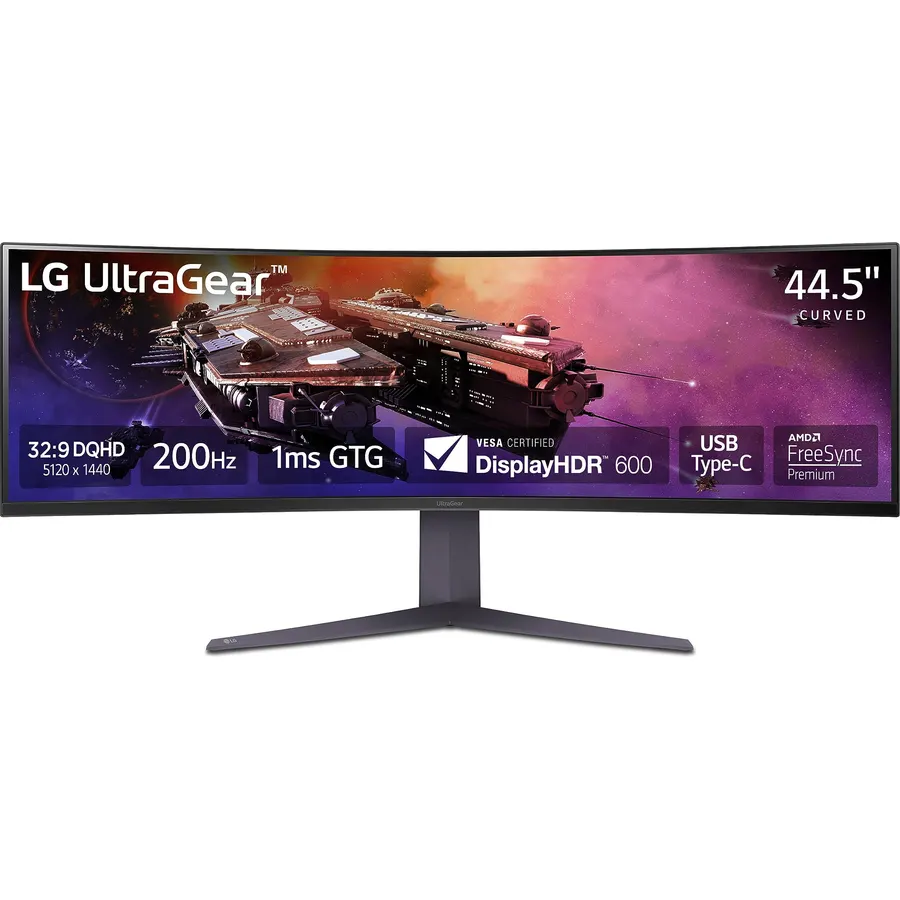
45" QHD (5120 x 1440) Curved Display - Make room on your desktop for the massive 45” curved UltraGear QHD monitor with a 32:9 aspect ratio. Play, stream and create on a high refresh rate display, in vivid color, on one screen at the same time.
VESA DisplayHDR 600 with up to DCI-P3 95% - This UltraGear display supports up to 95% of the DCI-P3 color gamut, expressing high-fidelity color paired with VESA DisplayHDR 600 delivering dynamic contrast and brightness on the QHD display..
Picture in Picture / Picture by Picture - OnScreen Control supports both Picture-in-Picture (PiP) and Picture-by-Picture (PbP) allowing you to configure your monitor to show content from two separate input sources. Play, watch, stream or work from multiple input sources at the same time, on one screen.
200Hz refresh rate, 1ms (GtG) response time - Gear up for smooth gameplay with a super responsive 200Hz display and a 1ms (GtG) response time. The faster speed lets you respond quickly to opponents and stay a step ahead of the competition.
DQHD@200Hz by DP, HDMI, USB Type-C - Enjoy smoother, vivid colors and high-resolution graphics thanks to HDMI 2.1, DisplayPort 1.4, and USB Type C. All three connections are supported on this display and let you experience up to 200Hz refresh rate.
USB Type-C - Seamlessly connect to external devices or charge your laptop with the convenience of USB Type-C with up to 90W power delivery.
AMD FreeSync Premium Pro - AMD FreeSync Premium Pro equips serious gamers with a fluid, virtually tear-free gaming experience. With at least 120hz refresh rate at minimum FHD resolution and low latency gameplay, you'll never miss a frame of the action as you play at peak performance.
Gamer-Centric Design - Your battlestation upgrade will be complete with the three-side, virtually borderless, display design and LED Hexagon backlighting. Plus, easily make height, tilt and swivel adjustments to the display to be able to see and play exactly to your specs.
45" QHD (5120 x 1440) Curved Display - Make room on your desktop for the massive 45” curved UltraGear QHD monitor with a 32:9 aspect ratio.
Ranked #99 in Monitors · 4 things we like
Quick answer The LG 45GR75DC-B Ultragear Curved Gaming Monitor scores 8.6/10 with us. Amazon owners rate it 4.3 out of 5 across 134 reviews, in line with the 4.3 average of the 494 products we track in Monitors. It was listed at $699.99 on Amazon when we last checked in September 2026. Key facts: aspect ratio 32:9, connectivity technology HDMI, display resolution maximum 5120x1440.
Bolster your battlestation! Featuring a huge 45” QHD (5120 x 1440) curved screen at a 32:9 aspect ratio, the vast display envelops gamers in play, streaming, work and creative products all on one monitor at the same time. With gaming-focused features such as up to a 200Hz refresh rate, a 1ms response time, AMD FreeSync Premium Pro and built-in KVM, this UltraGear monitor is fast and smooth with virtually tear- and stutter-free gameplay.
The gaming monitor also provides deep, rich color and contrast courtesy of up to 95% DCI-P3 color coverage & VESA DisplayHDR 600. This UltraGear display offers a host of connectivity options such as USB Type-C with 90W power delivery, HDMI 2.1 (x2), DisplayPort, USB (x3) and 4-pole headphone jack. And with a 3-side, virtually borderless design and a screen that is height, tilt and swivel adjustable, this UltraGear monitor is the perfect centerpiece for a
Do Best Deal is a participant in the Amazon Services LLC Associates Program. As an Amazon Associate we earn from qualifying purchases. If you buy through links on this site we may earn a commission, at no extra cost to you. Learn more.
Product information
24 specifications
Adaptive Sync
FreeSync Premium Pro
Additional Features
Curved
Aspect Ratio
32:9
Brightness
400 candela_per_square_meter
Color
Black
Color Gamut
95
Connectivity Technology
HDMI
Contrast Ratio
3000:1
Display Resolution Maximum
5120x1440
Display Technology
VA
Display Type
VA
Hardware Connectivity
DisplayPort, HDMI, USB Type C
Item Dimensions D x W x H
12.9"D x 42.7"W x 22"H
Item Weight
19.4 pounds
Native Resolution
5120x1440
Picture Quality Enhancement Technology
Exists
Pixel Pitch
0.21
Power Consumption
35 watts
Refresh Rate
200 hertz
Resolution
5K QHD 1440p
Screen Finish
Matte
Screen Size
45 inches
Specific Uses For Product
Gaming
Viewing Angle
178 degrees
Pros & cons
What we like
45" QHD (5120 x 1440) Curved Display - Make room on your desktop for the massive 45” curved UltraGear QHD monitor with a 32:9 aspect ratio. Play, stream and create on a high refresh rate display, in vivid color, on one screen at the same time.
VESA DisplayHDR 600 with up to DCI-P3 95% - This UltraGear display supports up to 95% of the DCI-P3 color gamut, expressing high-fidelity color paired with VESA DisplayHDR 600 delivering dynamic contrast and brightness on the QHD display..
Picture in Picture / Picture by Picture - OnScreen Control supports both Picture-in-Picture (PiP) and Picture-by-Picture (PbP) allowing you to configure your monitor to show content from two separate input sources. Play, watch, stream or work from multiple input sources at the same time, on one screen.
200Hz refresh rate, 1ms (GtG) response time - Gear up for smooth gameplay with a super responsive 200Hz display and a 1ms (GtG) response time. The faster speed lets you respond quickly to opponents and stay a step ahead of the competition.
What could be better
LG 45GR75DC-B Ultragear Curved Gaming Monitor: questions & answers
Is the LG 45GR75DC-B Ultragear Curved Gaming Monitor worth buying?
Yes, it is one of the stronger picks in its group. We score the LG 45GR75DC-B Ultragear Curved Gaming Monitor 8.6 out of 10. Amazon owners rate it 4.3 out of 5 across 134 reviews, in line with the 4.3 average of the 494 products we track in Monitors.
How much does the LG 45GR75DC-B Ultragear Curved Gaming Monitor cost?
It was listed at $699.99 on Amazon when we last checked in September 2026. Amazon prices change daily, so use the price button on this page to see the current figure.
What are the key specs of the LG 45GR75DC-B Ultragear Curved Gaming Monitor?
Aspect Ratio: 32:9; Connectivity Technology: HDMI; Display Resolution Maximum: 5120x1440; Refresh Rate: 200 hertz; Resolution: 5K QHD 1440p; Screen Finish: Matte. All 24 specifications are in the product information table on this page.
What are good alternatives to the LG 45GR75DC-B Ultragear Curved Gaming Monitor?
Similar, well-rated products in our catalog: LG 27G610A-B 27-inch Ultragear QHD (8.8/10, 4.4 stars from 188 owners); LG 27GR83Q-B 27-inch Ultragear QHD (8.8/10, 4.4 stars from 789 owners); LG 27GX700A-B 27-inch Ultragear QHD (8.0/10, 4.0 stars from 152 owners).
Breakdown from the 10 most helpful reviews we imported.
R
Robb
Verified purchaseNovember 13, 2025
Welcome to a good sweet spot.
Buying a monitor is not unlike Goldilocks trying to figure out exactly what porridge she likes. Is it too wide, too small? Too tall, too narrow? Do I need picture by picture or Picture in Picture? Do I need high ppi and usb hub built in? Do I game a lot do a game a little? Do I go with VA or OLED or IPS? These are just a few of the challenges I have had picking what ended up being this monitor. I really feel this is the sweet spot for the professional who uses the screen for both work and play. It’s a VA panel so it has great brightness, 200 MHz speed which is plenty fast for just about every
S
stargazer
Verified purchaseApril 20, 2024
Game changer — replaced a trio of monitors with one
After years of trying to fit windows on one of several monitors (so they did not spread across 2 monitors), I purchased a 4k 42” monitor. That was much bigger, of course, but the windows at the top of the screen were so high they were harder to read (fine print) and caused neck strain. This one seems perfect. It fits on my desk, and there is lots of room to place windows for productivity, lab use (many windows for various instruments), and yes, gaming. I’m happy to report that my graphics card (RTX 4080) easily drives this at native resolution, at over 100 fps except for insane boss fights in
C
Charmed
Verified purchaseFebruary 3, 2024
Took me two years to find one I like!!!!
Two yers ago when I bought my new Mac I loved it and still do!! I just wanted more screen Real estate as my brother. :-) I looked and looked for two year!! I wanted something that could keep up with the specs of my Mac when it comes to the refresh rate. My Mac runs at 120HZ the monitor can run up to 200HZ my main computer can support it up to 144HZ and it is a 2021. Even my brother who is more picky than me said 144HZ is plenty. When it comes to computers I would say he's right. I love how light is was when lifting it. It only took a few to set up! I know the price tag was definitely steep, bu
C
Carlos Flores
Verified purchaseJune 3, 2024
Amazing for productivity, decent for anything else
I found that this monitor does exactly what I wanted out of it. A way to dock both my personal and work laptops with one cable, and have it feel like I have dual monitors. This is great because my work laptop only supports one external monitor, so my dual monitor home office setup felt useless. While I only really use it for office use (I really dislike ultrawide gaming), the high refresh rate is still awesome since I'm used to 144Hz for my gaming PC and 120Hz on the native display for my personal laptop.The main reason I'm taking off a star is that I feel text may not be the most crisp I've e
S
Suhail Tikoo
Verified purchaseDecember 27, 2024
Amazing Screen! Fullfills the productivity Needs
I got it on Cyber Monday sales, while it took a week to come, I really fell in love as soon as i unboxed it. It was super easy to setup.Pro Tip: Do not throw the box or the foam away, it has an easy to carry design which would be useful if you need to pack this beast and move to a new place.I am a sucker for USB-C connectivity charing my Macbook Pro and Macbook Air. Hence, I got the version that has the feature. I have a lot of fun using the screen! Mostly use it for productivity tasks. It is a ~45 inch screen ultra wide which means you do get less vertical size. Not a dealbreaker but be mindf
S
scheidell
Verified purchaseFebruary 10, 2025
Preliminary Review: its BIG. but beware: it will NOT work with hdmi
first, plugged it into my widows 11 surface pro via usb c on surface dock-> hdmi on the monitor.Nothing, nothing at all, (went to sleep) can't find the off button, likely buried the the huge 1/2 page manual.then plugged it directly into the surface pro.FRCK, only 1920x1080? nothing i can do?then used their usbc to usbc, got my 5120x1440, looks nice, could be 'crisper' i don't know how to fix that.need to try it in the docking station so i don't need to do two things to dock.ok, i se lg electronics inc. -extension 1.1.2024.522 (driver) lets try that. nothing really, go to lg.com, downlaod manua
Z
Zibix
Verified purchaseJuly 11, 2024
Exceeds Expectations!
Had to retire my Apple Thunderbolt display after 12+ years. And Chose this as my replacement. Mostly for Development work. But a bit of gaming. After all the reviews, I was concerned about the height, curve and possible dead pixels. But all concerns were non-existent. This monitor is amazing. The curve is very slight and perfect for my desk and viewing angle. The height is a tiny bit smaller than my thunderbolt display, but the vertical resolution is the same and I barely notice. For database and development work it, this is a dream. The picture is crisp and I can fit 3 nice sized windows on t
A
Alex Long
Verified purchaseSeptember 11, 2025
10/10 Perfection. Wish I had 2 of them.
Unbelievable. I love this monitor so much. I never write reviews, ever. I needed to for this.Amazing for work productivity and even better for gaming. Love the double input feature.Thank you LG for another perfect product. Came quick and box was in perfect condition.Thank you!
Customer reviews are shown as published on Amazon and are not written by Do Best Deal.
More monitors we compared
Alternatives to the LG 45GR75DC-B Ultragear Curved Gaming Monitor