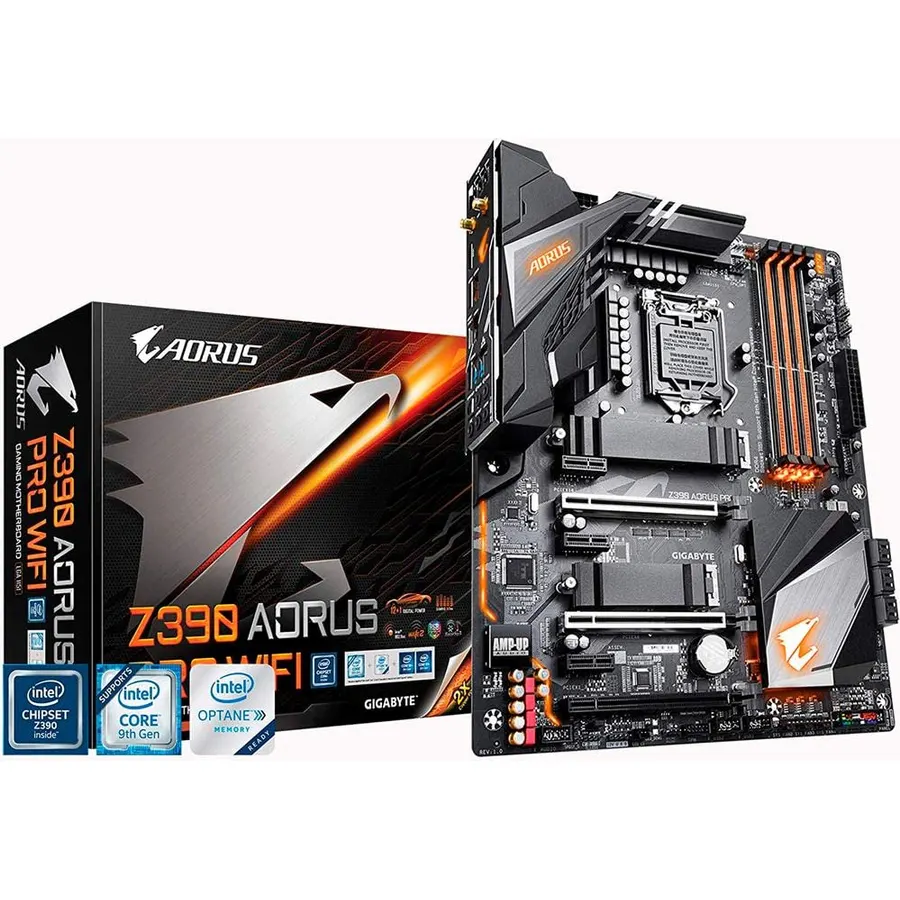
Quick answer The GIGABYTE Z390 AORUS PRO Wi-Fi scores 9.0/10 with us. Amazon owners rate it 4.5 out of 5 across 2,188 reviews, above the 4.3 average of the 147 motherboards we track. It was listed at $299.99 on Amazon when we last checked in September 2026. Key facts: processor socket LGA 1151, ram memory technology DDR4, memory clock speed 4400 MHz.
Supports 9th and 8th Intel Core processors Dual Channel DDR4, 4 DIMMs integrated I/O shield Intel Octane Memory Ready 12+1 phase digital VRM solution with DrMOS advanced thermal design with screw mounted heatsinks and heat pipe Intel 802.11AC 2x2 Wave 2 Wi-Fi ALC1220 VB enhance 114dB(Rear)/110dB(Front) SNR in microphone with WIMA audio capacitors Intel Gigabit LAN with cFosSpeed RGB Fusion with Multi Zone LED light Show design, support addressable LED & RGB LED strips Smart Fan 5 features Multiple Temperature Sensors and Hybrid Fan Headers with FAN STOP front USB 3.1 Gen 1 Type C Header dual Ultra-Fast NVMe PCIe Gen3 x4 M.2 with dual thermal Guard CEC 2019 Ready. 305x244 mm.
Do Best Deal is a participant in the Amazon Services LLC Associates Program. As an Amazon Associate we earn from qualifying purchases. If you buy through links on this site we may earn a commission, at no extra cost to you. Learn more.
Product information
24 specifications
Processor Socket
LGA 1151
Compatible Devices
Gaming Console
RAM Memory Technology
DDR4
Compatible Processors
8th Generation Intel Core
Chipset Type
Intel Z390
Memory Clock Speed
4400 MHz
Platform
Windows 10, Windows 7, Windows 8 Pro, Windows 8.1
CPU Model
Core i9
Memory Storage Capacity
1000 TB
Ram Memory Maximum Size
2048 GB
Main Power Connector Type
24-Pin
Graphics Card Interface
PCI Express
Memory Slots Available
4
Number of Ports
1
S/PDIF Connector Type
Optical
System Bus Standard Supported
SATA 3
Total SATA Ports
1
USB 2.0
1
Total Usb Ports
1
Number of Ethernet Ports
1
Total Number of HDMI Ports
1
Total PCIe Ports
4
Chipset Family
LGA1151
Brand
GIGABYTE
Pros & cons
What we like
Supports 9th and 8th Intel Core processors
Dual channel non-ECC unbuffered DDR4, 4 DIMMs
Intel optane memory ready
12+1 phases digital VRM solution with DrMOS
What could be better
GIGABYTE Z390 AORUS PRO Wi-Fi: questions & answers
Is the GIGABYTE Z390 AORUS PRO Wi-Fi worth buying?
Yes, it is one of the stronger picks in its group. We score the GIGABYTE Z390 AORUS PRO Wi-Fi 9.0 out of 10. Amazon owners rate it 4.5 out of 5 across 2,188 reviews, above the 4.3 average of the 147 motherboards we track.
How much does the GIGABYTE Z390 AORUS PRO Wi-Fi cost?
It was listed at $299.99 on Amazon when we last checked in September 2026. That is more than the $183.99 median for motherboards in our catalog. Amazon prices change daily, so use the price button on this page to see the current figure.
What are the key specs of the GIGABYTE Z390 AORUS PRO Wi-Fi?
Processor Socket: LGA 1151; RAM Memory Technology: DDR4; Memory Clock Speed: 4400 MHz; Memory Storage Capacity: 1000 TB; Ram Memory Maximum Size: 2048 GB; Graphics Card Interface: PCI Express. All 24 specifications are in the product information table on this page.
What are good alternatives to the GIGABYTE Z390 AORUS PRO Wi-Fi?
Similar, well-rated motherboards in our catalog: Gigabyte Z390 AORUS Elite (8.8/10, 4.4 stars from 586 owners); GIGABYTE Z390 Gaming X (9.0/10, 4.5 stars from 649 owners); MSI MPG Z390 Gaming PRO Carbon LGA1151 (9.0/10, 4.5 stars from 702 owners).
Breakdown from the 10 most helpful reviews we imported.
K
Kris
Verified purchaseJanuary 2, 2019
Awesome Motherbaord
After researching the top 3 brands of motherboards (Asus, MSI, Gigabyte), I decided to go with the Gigabyte Z390 Aorus Pro WiFi board for my Intel i7-8700K. I was looking for certain features including a board with WiFi and the latest M.2 NVMe Technology, and not too much bling with lightsSo far, I am very pleased and happy with this board because I wanted to use Samsung's 970 EVO 500 Gb M.2 NVMe SSD. And so far, the stick is working smoothly with Windows 10 installed. The board instantly recognized the stick without doing any setting in the BIOS. Just make sure you only have this SSD installe
E
Euphoric!
Verified purchaseSeptember 9, 2022
Not the most user-friendly, but best performance for the price hands down
It was just under $200 when I purchased it. It's a great motherboard, but it is NOT for beginners. I have been using this motherboard since October 2020 and it has been smooth sailing.A few notes I had to learn the hard way since it isn't well documented...- The board IS Windows 11 compatible. You have to go into the BIOS settings, activate TPM, and then Windows 11 can be installed without issue- It is ARGB compatible, but the instructions are... confusing to say the least, in the instruction manual.- Gigabyte is not known for having robust or stable firmware, but it can still be a worthwhile
T
Ty
Verified purchaseApril 17, 2019
Nice Mobo
Built another system for myself-my ASUS mobo arrived DOA, and after months of fighting I gave up on them. Found this board-was a little apprehensive, as this was the first time I used something other than ASUS in over a decade. I'm pleasantly surprised. This board has delivered well in every area. Designed well, plenty of extra connectors, all the USB support I like, even wifi support built in as an added plus. The bios isn't as intuitive as the ASUS boards, but I had no trouble with it as I'm used to tweaking settings-a novice user might have some difficulty.The only thing that I would consid
K
Kevin C
Verified purchaseFebruary 18, 2021
Great board, super thermals, designed to handle the 9 Series from the ground up with power phases.
I've got nothing bad to say about this one. I'm not a Gigabyte fan in general, but they got this one right. I put a lot of effort into building it as a gamer for a specific client, and it did everything well when I tested it and shipped it out. Just recently had contact with the buyer, he absolutely loves it still, won't even consider "upgrading" to the Intel 10 series because he doesn't want to switch boards. This has all the bells and whistles (ARGB headers being his favorite), but it's still as rock solid performance-wise as they come. The lighting is cool, even I admit it. The software to
L
LoneWolf15
Verified purchaseJune 2, 2019
The best priced option for your hard earned money
Background: I have worked in IT for 24 years; my first several years were in the 90s in a small shop that built PCs.I upgrade about every five years at this point, and for the first time in awhile, competition in the market has produced worthwhile advancements, so I went shopping to upgrade my Core i7-4790K system, choosing the Intel i9-9900K because I found a good deal on pricing. I have used most major brands of mainboards available (Gigabyte, MSI, ASUS, Asrock); I looked at all major brands for a solid Z390 board of quality construction, especially in voltage regulation, but with a measure
J
Joshua
Verified purchaseJune 22, 2019
Starting At 5 Stars
I will start this review at 5 stars simply for the fact that I plugged everything in and booted up. It booted up no problem and windows adjusted to the new motherboard (been waiting for that for like 15-20 years and was promised before now and it never worked). Then I reset it and set my XMP profile to on and it has run my RAM at speeds without any issue at all. I am actually kind of amazed.So I've never had an easier install. First boot up the CPU was at 28c with a Deepmax 400 HSF. Last I saw it was 30-32c, which is still acceptable, and it's brand new so needs time to adjust to the paste. So
M
MariaChaChaCha
Verified purchaseOctober 25, 2019
Update your BIOS if using i9 CPUs
I bought this motherboard for my new PC, and got to installing Windows 10 right away. After about 15 minutes, the PC shut off and the motherboard stopped posting. After some research I found that certain versions of the BIOS in this motherboard aren't compatible with i9 gen CPUs. I ordered a replacement and the first thing I did before booting into Windows was install the latest BIOS version (F10 in my case) and everything worked like a charm.As others mentioned, this is a great motherboard for the price. The WiFi is particularly great, and since that was the main reason I chose to get this mo
M
Mr. Lebowski
Verified purchaseAugust 6, 2020
Great Value, Excellent Board.
I got this for $189, which I think was a great deal. The board is fast, has lots of good bells and whistles, and even a little bling with LED lights that can be controlled via software through Windows. The built-in WiFi is a huge plus, and it has a jillion USB ports.One thing that's often overlooked is the layout of the board. I have a big Noctua CPU air cooler, and the RAM doesn't get in the way on this board. The 16x PCI slot is also far enough away from the CPU that the graphics card doesn't cram up against the CPU cooler either, which is an improvement over other mobos I've had in the past
Customer reviews are shown as published on Amazon and are not written by Do Best Deal.
![ASRock A520M Pro4 AMD Ryzen 3000/4000 Series (Soket AM4) Compatible with A520 Chipset, Micro ATX Motherboard [Domestic Authorized Dealer Product]](https://dobestdeals-img-2.pages.dev/asrock-a520m-pro4-amd-ryzen-3000-4000-series.webp)