Quick answer The Razer Tartarus V2 Mecha-Membrane Gaming Keypad scores 8.4/10 with us. Amazon owners rate it 4.3 out of 5 across 12,687 reviews, in line with the 4.4 average of the 42 gaming keyboards we track. Key facts: connectivity technology USB-A, keyboard layout QWERTY, minimum required operating system version Windows 10.
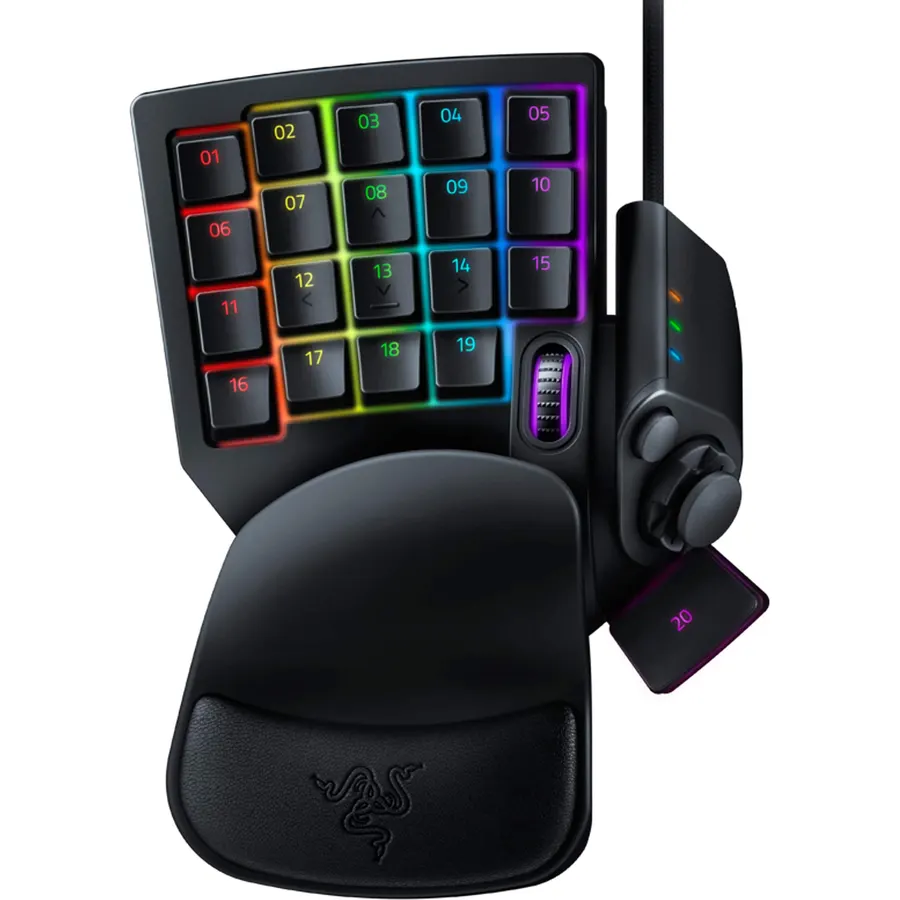
When you’re in the center of the battlefield, it’s crucial to do everything from cast spells to activate skills in a flash. With the Razer Tartarus V2, you can bind commands and skills and activate them instantaneously—all in the palm of your hand. The Razer Tartarus V2 provides endless commands at your fingertips with 32 fully programmable mecha-membrane keys, including an 8-way directional D-pad and 3-way scroll wheel.
The keypad also features individually programmable backlit keys with 16.8 million color options, all easily set through Razer Synapse. And with its improved ergonomic form factor and adjustable palm rest with two positions, you get the exact angle of comfort you need.
Do Best Deal is a participant in the Amazon Services LLC Associates Program. As an Amazon Associate we earn from qualifying purchases. If you buy through links on this site we may earn a commission, at no extra cost to you. Learn more.
Is the Razer Tartarus V2 Mecha-Membrane Gaming Keypad worth buying?
Yes, for most buyers it is a safe choice. We score the Razer Tartarus V2 Mecha-Membrane Gaming Keypad 8.4 out of 10. Amazon owners rate it 4.3 out of 5 across 12,687 reviews, in line with the 4.4 average of the 42 gaming keyboards we track.
What are the key specs of the Razer Tartarus V2 Mecha-Membrane Gaming Keypad?
Connectivity Technology: USB-A; Keyboard Layout: QWERTY; Minimum Required Operating System Version: Windows 10; Switch Type: Mecha-Membrane. All 24 specifications are in the product information table on this page.
What are good alternatives to the Razer Tartarus V2 Mecha-Membrane Gaming Keypad?
Breakdown from the 10 most helpful reviews we imported.
J
Jonathan
Verified purchaseJuly 21, 2026
A Must for Artists
After going through THREE Huion K20 keypads, all of which failed the same way (zoom/scroll wheel), I decided to try something new. I'm more of a keypad kind of guy rather than a Tour Box guy, so I decided to give this a try.After a month, ao far so good. Going from the K20 to the Tartarus has been relatively easy with minimal learning curve. More than enough keys for all of my shortcut needs with room for more. Keys feel great and responsive, scroll wheel is excellent, and my hand doesn't get too tired after extended sessions.If you're an artist, prefer defined keys over the TourBox form facto
N
NastyB
Verified purchaseApril 6, 2020
I like this thing. A lot.
I am loving this thing. I have always been a controller guy until I bought Doom Eternal, and it was obvious from the very first level that this game was made with mouse and keyboard in mind and I decided it was time to make the switch and I'm really glad I did. I stopped playing the game and waited for this to arrive, along with the Corsair Harpoon gaming mouse. It took A LONG time to start feeling comfortable with the new set up but once it started to click it made all the difference in the game. The learning curve for me was huge, maybe the biggest one I've had to go through in decades for g
B
BAJUNGADUSTIN
Verified purchaseJanuary 10, 2021
Razer Finally listened to real gamers and made a decent product for once.
I have been through every stage of this products life cycle. This is the 4th or 5th version of what was the Belkin N52. I personally started with the Belkin n52te (tournament edition) And I loved it. So much so that to this day I cant game without a left handed device. It drastically increases your performance in gaming due to it allowing you to feel more comfortable in your key presses and locations.After I used the old product for 10 years I decided to upgrade because it was slowly losing compatibility. Belkin had sold the product to Razer a while back and they made the TERRIBLE Tartarus v1.
J
Jedi Sentinel
Verified purchaseJanuary 1, 2022
It's different, but I'm never going back!
this review is written after 6 months of use, roughly. here are my pros and cons, not in order at all :)(April 2025 update: just added a 4 years later update at the end. I love this thing.)this is super nice for what i needed it for (a smaller gaming space), and i love the membrane keys, but i have made a few modifications to this to make it (in my opinion) better. they are fairly easy.1: i added a riser for the space bar. its WAY to low to comfterbly use, same for the 4 way d pad. i dont really use the d pad anyways, so having the riser didnt get in the way. it just brings the button up to a
G
Gary
Verified purchaseJune 6, 2026
Razer Tartarus V2 Gaming Keypad. Still kicks butt with new design.
Seems to work well. I've played some World of Warships with it so far. The Synapse 4 software is a bit harder to understand than the Synapse 2. I didn't even know there was a Synapse 3 but they don't support either the Syn 2 or Syn 3 any more. I've used Razor Tartarus V1 and Razor Orbweaver Chroma as an upgrade when they came out. So been using them like 20 years now. A really good piece of gaming hardware. This one is really smooth feel on the switches with not as much travel as the Orbweaver. Not sure why they put a scroll wheel on this one as everyone uses a mouse now days and well. Almost
S
Step
Verified purchaseJuly 5, 2022
Probably the best out there, which is a bummer. (Edited)
The Razer Tartarus V2 is a tough review for me. It really is a 1 of 1 product that does a lot of things right, but also some key things wrong. I want to give Razer constructive criticism so they keep trying to improve this device and not ditch it completely, but I also want them to know that there are some slight improvements to be made.I used this item for a couple weeks to see if I could get used to the feel of it. I wanted to see if this was something that I could realistically see myself gaming on exclusively. First off, the build quality is top notch, and the ergonomics are mostly fantast
J
Joshua
Verified purchaseJuly 6, 2026
The controller killer.
This is peak.I have been a console gamer my whole life. Buying a PC was a major step for me. Learning how windows works, how to download games, and most importantly how I play.One of my reasons for not switching to PC was the control scheme. Keyboards seemed so daunting. Endless keys, having to reach far away keys, and wrist pain.The Razer Tartarus v2 is single handedly the best way to learn mouse and keyboard. For my console friends there is a D-pad/Analog stick you can map the WASD keys to for a fluid transition from controller gaming. Over 20 mappable keys with an option to add even more wi
D
DeceptiveMind
Verified purchaseNovember 6, 2025
Wish I had purchased this years ago
Pros:-Ergonomics-Added game functionality within easy reach-Great RGB-Quality, tactile keysCons:-Noisy keys (sone might like this, personal preference)Amazing device. I have been a keyboard and mouse gamer since the days of Doom and Sim City Classic. I was skeptical for years about these and asked myself, “how would this be different than using the keyboard?”It is… so much better.I have always been the guy that has to remap everything to the arrow keys on a keyboard and the surrounding area. As a result, I also had to either have my wrist at an angle or the keyboard at an angle to reach them.
Customer reviews are shown as published on Amazon and are not written by Do Best Deal.
More keyboards we compared
Alternatives to the Razer Tartarus V2 Mecha-Membrane Gaming Keypad