Most Windows laptops built before the USB-C era run on a 19V or 19.5V barrel-tip power supply, and so do a surprising number of monitors, gaming laptops and small desktops today. When the original brick dies or stays at the office, the replacement needs three things right: the voltage (19V or 19.5V), enough amps for the laptop, and the exact tip. We ranked the 19V-class power supplies in our accessories catalog by output, which tips they ship with, which laptop families they fit, the safety protections listed, and what thousands of owners report after months of daily charging.
We have not bench-tested every adapter; the verdicts rest on the published specs and the owner review history. Prices are not printed because they change daily; every button opens the live Amazon page. If your laptop charges over USB-C instead, our USB-C laptop chargers guide is the one you want, and our broader replacement laptop chargers and AC adapters guide covers other voltages and brands.
How we picked
- 19V or 19.5V output stated on the listing. Every pick prints its voltage and amperage; we quote them exactly.
- The tip is named. HP 4.5 x 3.0 mm blue tip, Dell 4.5 mm, Asus 5.5 x 2.5 mm, or a set of interchangeable tips.
- Protections listed. Over-voltage, over-current, short-circuit and over-temperature protection on every pick.
- A power cord in the box on every two-piece adapter so it works on day one.
- Owner history. Every pick has hundreds of owner reviews and the top four have thousands; all sit at a strong owner rating or better.
The picks
45W Laptop Charger for HP Laptop Computer, 19.5V 2.31A Smart Blue Tip Power Adapter for HP Pavilion x360, Envy 11 13 15, EliteBook 840 G3 G5, Chromebook, Spectre, Stream 11 13 14 ProBook Notebook AC Adapter
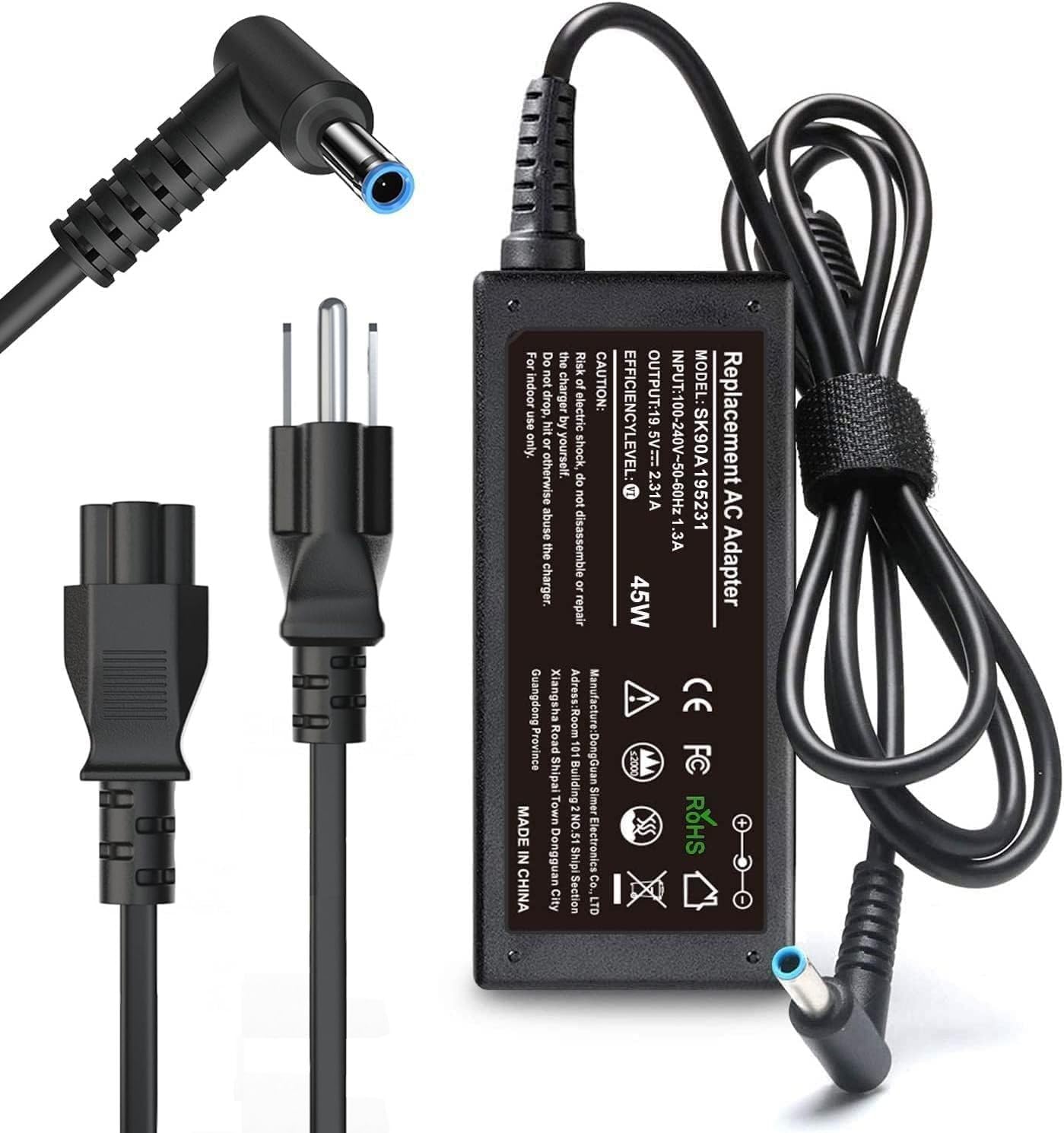
This is the replacement that thousands of HP owners buy, and the review history shows why: it outputs 19.5V at 3.33A for 65W, which also covers every 45W blue-tip HP laptop, so you do not have to work out which wattage your Pavilion or EliteBook shipped with. The 4.5 x 3.0 mm smart tip fits the Pavilion x360, Envy, EliteBook G3 through G8, ProBook, Chromebook, Spectre x360, Stream and ZBook ranges, the input is universal 100-240V, and the brick is slim enough to live in a laptop sleeve. The listed protection set covers over-voltage, over-current, short circuit and overheating, and the seller backs it with a 12-month replacement policy. It will not fit USB-C HP laptops or the older 7.4 mm big-tip models, which is the main cause of returns. Owners rate it excellently, and that history plus the 65W headroom makes it the first pick.
- Thousands of owner reviews with an excellent owner rating, the biggest base here
- 65W output that also runs 45W HP laptops
- Slim brick that fits a bag pocket
- AC cord included; 12-month replacement policy
- HP blue-tip laptops only; not for USB-C HP models
- Not for HP machines that use the 7.4 mm big tip
- Third-party, so the HP BIOS may not show the maker name
Compatible with HP Laptop Charger, 65W 45W Smart AC Adapter 4.5mm Blue Tip

Where the first pick wins on review volume, this HP adapter wins on build. The listing is specific about the parts that usually fail: the output cable has thick strain relief tested past 10,000 bends, there is a hook-and-loop tie so it coils neatly in a bag, and a smart IC chip with a flame-retardant case manages heat and stops the HP slow-charger warning. Output is the same 19.5V 3.33A for 65W with 45W compatibility, through the 4.5 x 3.0 mm blue tip, and the listing publishes a long run of HP part numbers to check against the label on your old brick. Owners rate it excellently across thousands of reviews. It fits only blue-tip HP laptops, and the seller is clear that USB-C and 7.5 mm models need something else. If your last charger died at the cable, start here.
- Cable strain relief rated for 10,000 bends, the main failure point on cheap adapters
- Smart IC prevents the slow-charging warning
- Thousands of owner reviews with an excellent owner rating
- Long list of HP part numbers to match against
- Blue tip only; ProBook and EliteBook models with USB-C or 7.5 mm tips need a different adapter
- Slightly bulkier than the first pick
- No wattage choice; it is always the 65W unit
SZGUDULO 90W Universal AC Adapter Laptop Charger for Dell HP Acer 16 Tips

A universal adapter is the right call when you have two or three older laptops in the house or do not know which tip you need until it arrives. The SZGUDULO puts out 19.5V at 4.62A for 90W, enough for larger Dell, HP and Acer machines, and steps down for 65W and 45W models, with 16 interchangeable tips that cover Dell, HP, Acer, Asus, Sony, Toshiba, Fujitsu, Gateway and most Chromebooks that use a barrel connector. The listing is long for a reason: you are meant to search it for your model number before buying. The trade-offs are inherent to universals. The voltage is fixed at 19.5V, which is within tolerance for most 19V laptops but not something every brand officially blesses, it tops out at 90W so gaming laptops are out, and if you pick the wrong tip you will be back on the listing. Thousands of owners rate it strongly, with the critical reviews almost all about tip fit.
- Sixteen tips cover most 19V and 19.5V barrel laptops of the last decade
- 90W output handles bigger 15 and 17 inch machines
- Thousands of owner reviews with a strong owner rating
- One spare for a household with mixed brands
- Fixed 19.5V, so a laptop that strictly needs 19V may complain
- Not for gaming laptops above 90W
- Tip selection is on you; a wrong tip means no charge
45W Charger Compatible with HP Laptop Charger Blue Tip 4.5mm, 741727-001 TPN-C125 HSTNN-LA40 HSTNN-DA40 854054-002 HSTNN-CA40 740015-002 740015-003 740015-004 15-f387wm 15-f272wm 15-f233wm

If your HP shipped with a 45W brick, you can pay for exactly that. This adapter outputs 19.5V at 2.31A through the 4.5 x 3.0 mm blue tip and lists compatibility by both model (HP 15 and 17 notebooks, a long run of Pavilion series, Stream, Chromebook, Spectre x360 and blue-tip EliteBooks) and HP part number, which is the most reliable way to match it. It is normally the lowest-priced HP pick on this page, and thousands of owners give it a strong rating. The limit is the 45W figure itself: plug it into a 65W Pavilion or EliteBook and you will get the slow-charger message or a battery that drains under load, which is why the 65W picks above cost a little more. The seller notes a one-month Amazon return window followed by its own 12-month warranty.
- The exact 45W spec for most HP 15 and 17 inch home laptops
- Thousands of owner reviews with a strong owner rating
- Very long compatibility list by model and part number
- Usually the cheapest blue-tip adapter here
- 45W only; a 65W HP laptop will charge slowly or warn
- Return window is one month, then it is the seller warranty
- Cable is thinner than the second pick
19V 6.32A 120W AC Adapter Fit for Asus FX504 UX510UW N56J N56VM N56VZ N750 N500 G50 N53S N55 Laptop, A15-120P1A PA-1121-28 Charger

Gaming and multimedia laptops need more than the 65W a standard brick gives, and Asus kept its FX, GL, ZX and N-series machines on a 19V 120W supply for years. This adapter replaces the A15-120P1A and PA-1121-28 originals with 19V at 6.32A, lists the FX504, UX510UW, N56, N750, G50, ZX53, FX53, FX63, FX73, GL551 and GL552 among its compatible models, and includes the usual protections against short circuit, over-current, over-voltage and overheating. It is a two-piece adapter with a cord in the box. The things to know: the tip is Asus-specific, so it is no use for anything else, 120W bricks are heavy, and Asus has used more than one barrel size, so match your model against the list. Hundreds of owners rate it strongly and report it running their laptops at full power under load, which the smaller universals cannot.
- True 19V output at 120W for Asus TUF, ROG and N-series laptops
- Replaces the A15-120P1A and PA-1121-28 originals
- Hundreds of owner reviews with a strong owner rating
- Power cord included
- Asus-specific tip; not a universal
- A 120W brick is heavy for travel
- Check your model list carefully; Asus used several tips over the years
19V DC Power Supply 19V 3.42A Power Adapter 65W 45W with 10tips
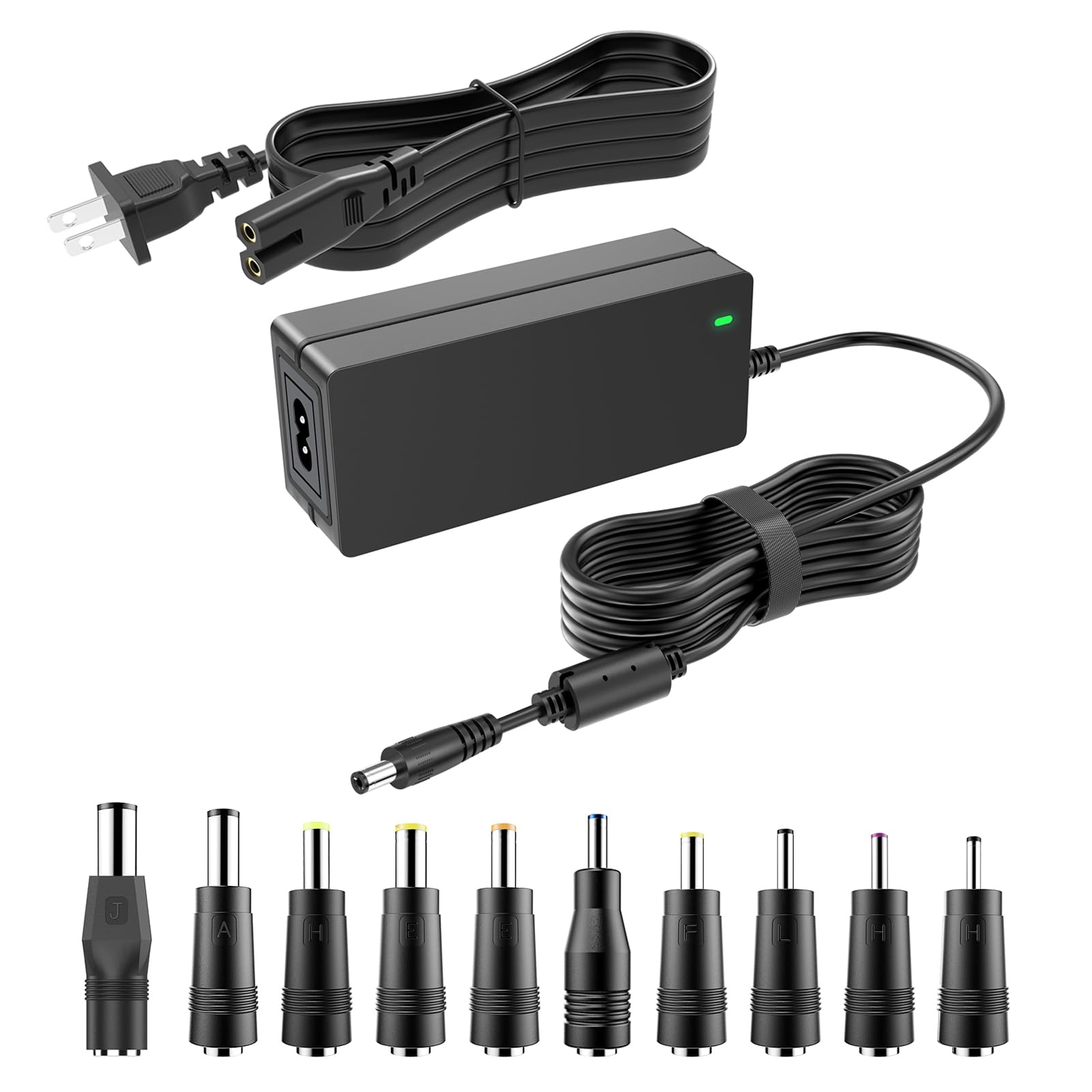
Not every 19V device is a laptop. LG and Samsung monitors, JBL and Harman Kardon speakers and Netgear Nighthawk routers all run on 19V bricks that go missing, and this supply covers them along with Acer, Asus, Gateway and Toshiba laptops that take a true 19V input. It outputs 19V at 3.42A for 65W through a 5.5 x 2.5 mm center-positive barrel and ships ten tip adapters from 7.4 x 5.0 mm down to 3.0 x 1.0 mm, carries UL, FCC and ETL marks, and has a ferrite ring on the cable to tame interference, which matters next to a monitor. Hundreds of owners rate it excellently. Note that it is a 19V unit, so HP and Dell laptops, which want 19.5V, should use the picks above, and the 4.5 x 3.0 tip here is a plain barrel rather than the HP smart tip. For everything else that says 19V on its label, it is the tidiest answer on the page.
- True 19V output with ten tips, so one brick serves a monitor, a router and an old laptop
- UL, FCC and ETL listed with an EMI ferrite ring
- Hundreds of owner reviews with an excellent owner rating
- 65W covers 45W devices too
- Not for 19.5V HP or Dell laptops
- Barrel tips only; no Lenovo square or USB-C
- The 4.5 x 3.0 tip is a plain barrel, not the HP smart tip
Dell Inspiron Laptop Charger Genuine 65W watt 4.5mm tip AC Power Adapter for Inspiron 13 14 15 3000 5000 7000 Series 5558 5755 3147 7348-2in1 5555 5559 0G6j41 0MGJN with Power Cord

Dell laptops are picky: plug in an adapter the BIOS does not recognize and the machine charges slowly or refuses to charge at all. That is the argument for this one, which is listed as a genuine Dell 65W adapter with the 4.5 mm tip used by the Inspiron 13, 14 and 15 across the 3000, 5000 and 7000 series, including the 5558, 5755, 3147, 7348 2-in-1, 5555 and 5559, and matches Dell part numbers 0G6j41 and 0MGJN. A power cord is included. The listing gives wattage but not the volt and amp line, which is unusual, and you will pay more than for the third-party HP adapters above. Owners rate it strongly across hundreds of reviews and the common theme is that it was recognized immediately where a cheaper adapter had not been. If your Inspiron has the 7.4 mm barrel from an earlier generation, this will not fit.
- Listed as a genuine Dell 65W adapter, so the Dell BIOS recognizes it
- Covers the Inspiron 3000, 5000 and 7000 series with the 4.5 mm tip
- Hundreds of owner reviews with a strong owner rating
- Compact brick with cord included
- Listing states wattage but not the volt and amp figures
- 4.5 mm tip only; older Inspirons use the 7.4 mm tip
- Genuine pricing is above the third-party HP picks
BIYTC 200W Laptop Charger for HP Victus Gaming 15 16 Omen Gaming 15 16

HP Victus and Omen gaming laptops ship with a 200W brick, and a 65W replacement will keep the battery alive but will not let the GPU run at full power. The BIYTC adapter outputs 19.5V at 10.5A for the full 200W through the standard 4.5 x 3.0 mm blue tip, matching HP part numbers TPN-DA10, L00818-850, N43500-001 and L03468-025, and lists over-charge, over-voltage, over-current and short-circuit protection. Because the tip is the common HP blue one, it will also charge a Pavilion or EliteBook in a pinch; the laptop only draws what it needs. It is a big, heavy brick meant to stay on a desk, and like every third-party adapter it may trigger a non-HP adapter notice in the BIOS. Hundreds of owners give it a strong rating and specifically report games running without the power-limit throttling that smaller adapters cause.
- Full 200W at 19.5V for Victus and Omen laptops that throttle on smaller bricks
- Matches the TPN-DA10 and related HP part numbers
- Hundreds of owner reviews with a strong owner rating
- Standard blue tip, so it also charges smaller HP laptops
- Large and heavy; a desk charger, not a travel one
- Only worth it for a gaming or workstation HP
- Third-party; HP may show a non-HP adapter notice
Compare the picks
| Product | Output | Tip | Fits | Type | Our score | Our score | |
|---|---|---|---|---|---|---|---|
| HP 65W/45W Smart Blue TipS SKSTYLE | 19.5V 3.33A 65W | 4.5 x 3.0 mm | HP blue-tip laptops | Brand-specific | 9.2/10 | 9.2 | See price |
| HP 65W 45W reinforced cableYenyoh | 19.5V 3.33A 65W | 4.5 x 3.0 mm | HP blue-tip laptops | Brand-specific | 9.2/10 | 9.2 | See price |
| SZGUDULO 90W universalSZGUDULO | 19.5V 4.62A 90W | 16 tips | Dell, HP, Acer, Asus and more | Universal | 8.6/10 | 8.6 | See price |
| HP 45W blue tipAYKLCZUU | 19.5V 2.31A 45W | 4.5 x 3.0 mm | HP 45W laptops | Brand-specific | 9.0/10 | 9.0 | See price |
| Asus 120WLVYATUO | 19V 6.32A 120W | Asus barrel | Asus FX, GL, ZX, N series | Brand-specific | 8.8/10 | 8.8 | See price |
| 19V 3.42A 10-tip supplyMareisa | 19V 3.42A 65W | 5.5 x 2.5 mm + 10 tips | 19V laptops, monitors, routers, speakers | Universal 19V | 9.1/10 | 9.1 | See price |
| Dell Inspiron 65W genuineDell | 65W | 4.5 mm | Dell Inspiron 3000/5000/7000 | Genuine | 9.0/10 | 9.0 | See price |
| BIYTC 200WBIYTC | 19.5V 10.5A 200W | 4.5 x 3.0 mm | HP Victus, Omen, Pavilion Gaming | Brand-specific | 8.8/10 | 8.8 | See price |
19V or 19.5V: does the half volt matter?
Usually not, but it is worth getting right. HP and Dell specify 19.5V; Asus, Acer, Toshiba, Gateway and most monitors specify 19V. Laptop power circuits tolerate a few percent either way, which is why the 19.5V universal in this guide runs 19V machines without drama, but some Dell and HP models check the adapter electronically and will refuse an unrecognized unit or limit charging. The safe rule from Do Best Deal: match the voltage printed on your old brick or on the label by the power jack, match or exceed the amps, and match the tip exactly. More amps are fine, because the laptop draws only what it needs; fewer amps mean slow charging and throttling under load.
Matching the tip
The 4.5 x 3.0 mm HP blue tip and the 4.5 mm Dell tip look similar but are not interchangeable: the HP connector has a center pin that carries an identification signal. Asus laptops of the 120W class use a larger barrel, and 19V monitors and speakers mostly use 5.5 x 2.5 mm or 6.5 x 4.4 mm. If you are not sure, the 16-tip SZGUDULO or the 10-tip 19V supply let you try several, and every brand-specific pick above publishes the HP, Dell or Asus part numbers it replaces; compare them with the sticker on your original adapter before ordering. Returns on these products are almost always a tip or wattage mismatch rather than a faulty unit.
Wattage: 45, 65, 90, 120 or 200
A thin 13 or 15-inch laptop with integrated graphics runs on 45W. Most mainstream 15 and 17-inch machines, and anything with a bigger battery, want 65W, which is why the 65W HP picks also serve 45W models and are the better buy for most people. Larger multimedia laptops go to 90W, which the SZGUDULO universal covers. Gaming laptops are their own class: the Asus FX and GL series need 120W, and HP Victus and Omen need the full 200W or the graphics card is capped. Buying one size up never hurts; buying one size down shows up as a slow-charger warning and a laptop that drains while plugged in.
Can I use a 19.5V charger on a 19V laptop?
In most cases yes, which is why universal adapters output 19.5V. The difference is within the tolerance of laptop power circuits. The exceptions are laptops that electronically verify the adapter; for those, use the brand-matched pick.
Can I use a 65W adapter on a laptop that came with 45W?
Yes, as long as the voltage and tip match. The laptop draws only the current it needs. The reverse, a 45W adapter on a 65W laptop, charges slowly and may trigger a warning.
Why does my HP say the adapter is not recognized?
HP blue-tip adapters carry an identification signal on the center pin. Some third-party units trigger a notice but still charge at full speed; a few older HP models limit charging. The two 65W HP picks here have the lowest rate of such complaints in their reviews.
Which pick works for a monitor or a router?
The 19V 3.42A supply with ten tips. It covers LG, Acer, Asus and Samsung monitors, JBL and Harman Kardon speakers and Netgear Nighthawk routers that use a 19V barrel input, as long as the device needs no more than 65W.
Is a genuine adapter worth the extra money?
For Dell, often yes, because Dell laptops check the adapter and the genuine 65W unit here is recognized immediately. For HP blue-tip laptops, the two third-party 65W picks have thousands of positive reviews and cost less.
Prices and stock change daily. The buttons above open Amazon so you always see the current price. We may earn a commission if you buy through them, at no extra cost to you.
Do Best Deal is a participant in the Amazon Services LLC Associates Program. As an Amazon Associate we earn from qualifying purchases. If you buy through links on this site we may earn a commission, at no extra cost to you. Learn more.
