A streaming stick lives in the worst place in the house for Wi-Fi: plugged into the back of a television, behind a large metal-backed panel, often inside a cabinet or against a wall. When video buffers, drops to a blurry picture or loses the connection, the stick is usually not the problem; the wireless link is. The cure is a small adapter that sits between the stick and its power cable and adds an RJ45 Ethernet port, so the stick uses a wired connection to the router and still gets power through the same lead. The only real decisions are the connector your stick uses, Micro USB or USB-C, and whether you need more than 100 Mbps. We ranked the adapters in our networking catalog by connector, stated speed, design and what owners report. The catalog did not have enough well-reviewed USB-A adapters for laptops, so this guide covers adapters for streaming sticks.
We have not connected these adapters ourselves; the verdicts rest on the spec sheets and the owner review history. Prices are not printed because they change daily; every button opens the live Amazon page. For the stick itself, see our streaming devices guide, and for the cable from the router, our Cat 6 Ethernet cables guide.
How we picked
- Made for streaming sticks. Every pick passes power through to the stick while adding a wired RJ45 port.
- Connector stated clearly. Micro USB and USB-C adapters are not interchangeable, so each entry says which it is and which devices the maker lists.
- Stated speed. We give the 100 Mbps or 1000 Mbps figure the maker claims and say where real-world speed will be lower.
- Practical design. Aluminum shells, indicator lights and adhesive tape for mounting behind a TV.
- Owner feedback. Every pick has more than a hundred owner reviews.
The picks
Micro USB to RJ45 Ethernet Adapter for Select Streaming Devices, Supports 100 Mbps Wired Internet, Compatible with Fire TV Stick 4K and Other Micro USB Devices, Adhesive Tape Included

This Micro USB adapter is the most-reviewed product in this guide by an enormous margin, with tens of thousands of owner reviews and a very strong owner rating, and it does exactly one thing. It connects to the Micro USB port of a streaming stick, passes power through, and gives the stick a wired Ethernet link of up to 100 Mbps, with no drivers or settings to change. The maker lists the Fire TV Stick 2, 3, 4K and 4K Max, the Google Home Mini, the Chromecast Ultra, 3, 2, 1 and Audio, and the Raspberry Pi Zero as compatible. The shell is aluminum alloy for heat dissipation during long sessions, and two self-adhesive tapes are included to fix it behind the TV. The listing is clear about limits: it is Micro USB only and will not work with Chromecast with Google TV or other USB-C devices. A hundred megabits is more than any 4K stream needs.
- Tens of thousands of owner reviews with a very strong owner rating
- 100 Mbps is ample for 4K streaming
- Aluminum shell sheds heat
- Listing clearly states what it does not fit
- Not for USB-C devices such as Chromecast with Google TV
- 100 Mbps ceiling
- Ethernet cable is not listed as included
ZEXMTE USB C to Ethernet Adapter for Chromecast with Google TV- USB C to Rj45 Ethernet Network Adapter, Compatible with Chromecast Google TV (HD/ 4K), Laptop, Tablet - Adhesive Tape Include

Chromecast with Google TV uses a USB-C port, so it needs a different adapter, and this ZEXMTE is the best-rated option for it. It combines an RJ45 Ethernet port with a USB-C charging port that the maker rates to 100 watts, so the Chromecast is powered through the adapter while it uses a wired connection of up to 100 Mbps. No drivers are needed, the housing is aluminum with reinforced connections and what the listing calls a built-in smart chip for protection, and adhesive tape is included for mounting. The maker also lists USB-C laptops and tablets. One note of caution: the compatibility list mentions the Fire TV Stick 4K, the Mi TV Stick and a Roku stick, which have Micro USB ports, so treat this as an adapter for USB-C devices only. More than a hundred owners give it a good owner rating. For the Google TV dongle, it is the tidy solution.
- More than a hundred owner reviews with a good owner rating
- Powers the stick and adds Ethernet in one adapter
- Also works with USB-C laptops and tablets, per the maker
- Aluminum housing with built-in protection
- 100 Mbps, not gigabit
- Compatibility list also names Micro USB sticks, which this USB-C plug cannot fit directly
- Smaller review base than the top pick
ELECTOP 1000 Mbps Ethernet Adapter for Fire TV Stick, Micro USB to RJ45 Gigabit Ethernet Network Adapter Compatible with 4K Fire Stick, Chromecast Google Home Mini and More Streaming TV Sticks

ELECTOP’s adapter is for people who want the fastest Micro USB option on paper. It has a gigabit Ethernet port and the maker claims up to 1000 Mbps, in an aluminum alloy shell with an LED indicator that shows the connection status, and two self-adhesive tapes for mounting. It is plug and play, with the Fire TV Stick 4K, Google Home Mini, Chromecast Ultra, 3, 2, 1 and Audio, and Raspberry Pi Zero listed as compatible, and the listing describes over-voltage and over-current protection. More than a hundred owners give it a strong owner rating, the best among the adapters below the top pick. Be realistic about the headline number: a streaming stick’s Micro USB port and its own hardware set the ceiling, so you should not expect a full gigabit at the device. It also sits in a higher price class than the 100 Mbps adapters. Buy it for headroom, not for a promise of ten times the speed.
- Strong owner rating from more than a hundred owners
- Gigabit Ethernet port
- LED shows connection status
- Stated over-voltage and over-current protection
- Real speed is limited by the stick and its USB port
- Costs more than the 100 Mbps adapters
- Not for USB-C devices
USB Ethernet Adapter (Silver) for Fire TV Stick Lite/4K/4k Max Firestick or Chromecast with Micro not Type C connection, USB to RJ45 Ethernet, 3ft (1m) USB Power Supply Cable, Speeds up to 100 Mbps

The TV xStream adapter stands out for its lead. Where most stick adapters have short tails, this one comes with a 3.3 foot USB power cable, which helps when the outlet or the powered USB port is not right behind the television. It is a Micro USB adapter with 10/100 Mbps Ethernet, driver-free, listed for the Fire TV Stick Lite, 4K and 4K Max and for Chromecast models that use Micro USB, and the title spells out that it is not for Type-C connections. The maker also states that it is not for Roku or first generation Fire TV Sticks, and that the device must support OTG. Support is a selling point: the listing offers a TV xStream warranty with phone support. More than a hundred owners give it a good owner rating. The bullet about the wall plug is cut short in our data, so check the listing for whether a power adapter is included.
- 3.3 ft power cable reaches a distant outlet or USB port
- Listing states which devices it does not support
- Phone support offered
- Good owner rating from more than a hundred owners
- Device must support OTG, per the maker
- Check the listing for whether a wall plug is included
- 100 Mbps ceiling
ZEXMTE 1000Mbps Ethernet Adapter for Chromecast with Google TV, USB C to RJ45 Gigabit Ethernet Adapter Compatible with Chromecast with Google TV HD/4K, Laptop, Tablet, 2 Pack
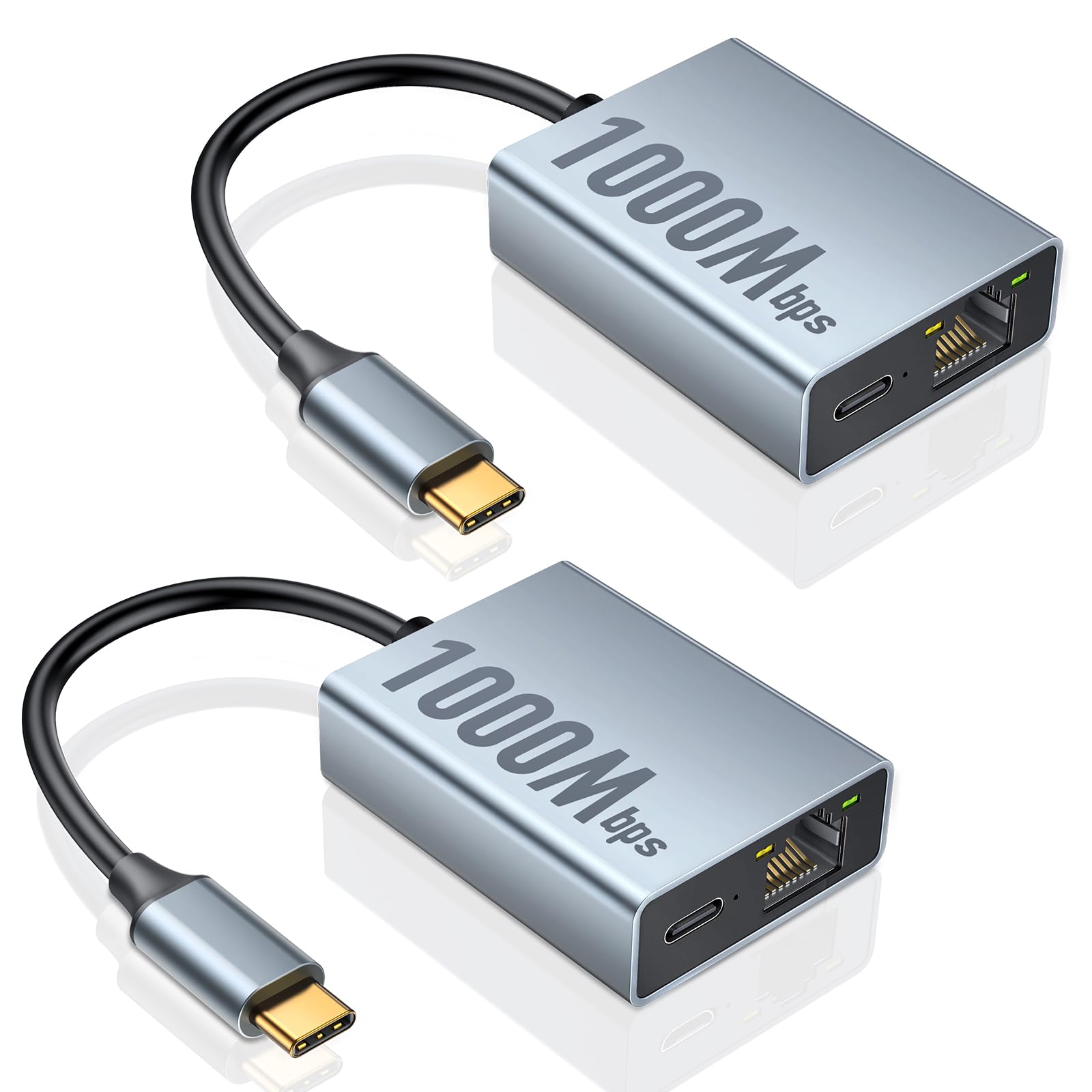
This ZEXMTE pack suits a home with two USB-C streaming devices. It contains two USB-C to RJ45 adapters rated by the maker at up to 1000 Mbps, with the honest qualifier that actual speed depends on the bandwidth of your broadband. They are plug and play, built with an aluminum alloy shell and a reinforced connection, and the listing describes over-voltage, over-current and over-power protection. Compatibility is given as Chromecast with Google TV in both HD and 4K versions, plus smartphones and tablets with a USB-C port, and two adhesive tapes are included for fixing the adapters out of sight. More than a hundred owners have reviewed it, and the owner rating is decent but the lowest of the five picks, which is why it ranks last. One bullet in the listing refers to the Fire TV Stick, but this is a USB-C adapter and will not plug into a Micro USB stick.
- Two adapters in one order
- Gigabit-rated USB-C adapter
- More than a hundred owner reviews
- Stated over-voltage, over-current and over-power protection
- Lowest owner rating of the five picks
- Maker notes speed depends on your broadband
- Not for Micro USB sticks
Compare the picks
| Product | Connector | Stated speed | Best for | Extras | Our score | Our score | |
|---|---|---|---|---|---|---|---|
| Micro USB 100 Mbps adapterGeneric | Micro USB | 100 Mbps | Fire TV Stick, older Chromecast | 2 adhesive tapes | 9/10 | 9.0 | See price |
| ZEXMTE USB-C adapterZEXMTE | USB-C | 100 Mbps | Chromecast with Google TV | 100W charging port, tape | 8.6/10 | 8.6 | See price |
| ELECTOP gigabit adapterELECTOP | Micro USB | 1000 Mbps claimed | Fire TV Stick 4K | LED indicator, 2 tapes | 8.7/10 | 8.7 | See price |
| TV xStream adapterTV xStream | Micro USB | 10/100 Mbps | Fire TV Stick Lite, 4K, 4K Max | 3.3 ft power cable | 8.6/10 | 8.6 | See price |
| ZEXMTE gigabit 2-packZEXMTE | USB-C | 1000 Mbps claimed | Two USB-C devices | 2 adapters, 2 tapes | 8.3/10 | 8.3 | See price |
Micro USB or USB-C: check your stick first
The connector decides everything. Fire TV Sticks covered by these listings, and the older Chromecast models, take power through a Micro USB port, the small trapezoid-shaped socket. Chromecast with Google TV uses USB-C, the slim oval one. The two do not fit each other, and a mismatch is the most common reason for a return, which is why the top pick’s listing states outright that it will not work with Chromecast with Google TV. Look at the port on your device, then check that your exact model appears in the compatibility list. Makers also note exclusions: the TV xStream adapter is not for Roku or first generation Fire TV Sticks.
Is 100 Mbps enough?
For streaming, yes. A 4K stream typically needs somewhere in the region of 15 to 25 Mbps, so a steady 100 Mbps wired link leaves plenty of room, and it is steadier than a faster but fluctuating wireless one. Gigabit-rated adapters are useful headroom, but the adapter is only one link in the chain: the stick’s USB port, its processor and your broadband plan all set limits, and ZEXMTE says as much. If your stick buffers on Wi-Fi, a 100 Mbps wired adapter will almost always solve it. Choose a gigabit adapter if the price difference is small or you also plan to use it with a USB-C laptop or tablet.
Setting it up behind the TV
Installation takes a minute. Unplug the power lead from the stick, plug the adapter into the stick’s power port, connect the stick’s original power cable and power adapter to the adapter’s power input, then run an Ethernet cable from the adapter to your router or a switch. Use the power adapter that came with the stick; a TV’s USB port often cannot supply enough current. The stick should switch to the wired connection on its own, and you can confirm it in the network settings. Fix the adapter with the supplied tape so its weight does not pull on the stick’s port.
Does an Ethernet adapter stop a Fire TV Stick from buffering?
If the buffering is caused by weak or congested Wi-Fi, which is common behind a television, a wired adapter usually fixes it. It will not help if your broadband connection itself is too slow or the streaming service is having problems.
Which adapter do I need for Chromecast with Google TV?
A USB-C one. The ZEXMTE USB-C adapter with a charging port is the best-rated choice here, and the ZEXMTE gigabit 2-pack covers two devices. Micro USB adapters, including the top pick, will not fit Chromecast with Google TV.
Do these adapters need drivers or setup?
No. All five are described as plug and play. Connect the adapter between the stick and its power cable, plug in an Ethernet cable from the router, and the stick should use the wired connection automatically.
Will a gigabit adapter make my stick faster than a 100 Mbps one?
Rarely in a way you would notice. A 4K stream needs far less than 100 Mbps, and the stick and your broadband plan limit the real speed. A gigabit adapter offers headroom and is more useful if you also use it with a laptop or tablet.
Do I still need the power adapter for my streaming stick?
Yes. The Ethernet adapter passes power through to the stick, so you connect the original power cable and wall adapter to it. Check each listing for what is in the box, since an Ethernet cable and wall plug are often not included.
Prices and stock change daily. The buttons above open Amazon so you always see the current price. Do Best Deal may earn a commission if you buy through them, at no extra cost to you.
Do Best Deal is a participant in the Amazon Services LLC Associates Program. As an Amazon Associate we earn from qualifying purchases. If you buy through links on this site we may earn a commission, at no extra cost to you. Learn more.
