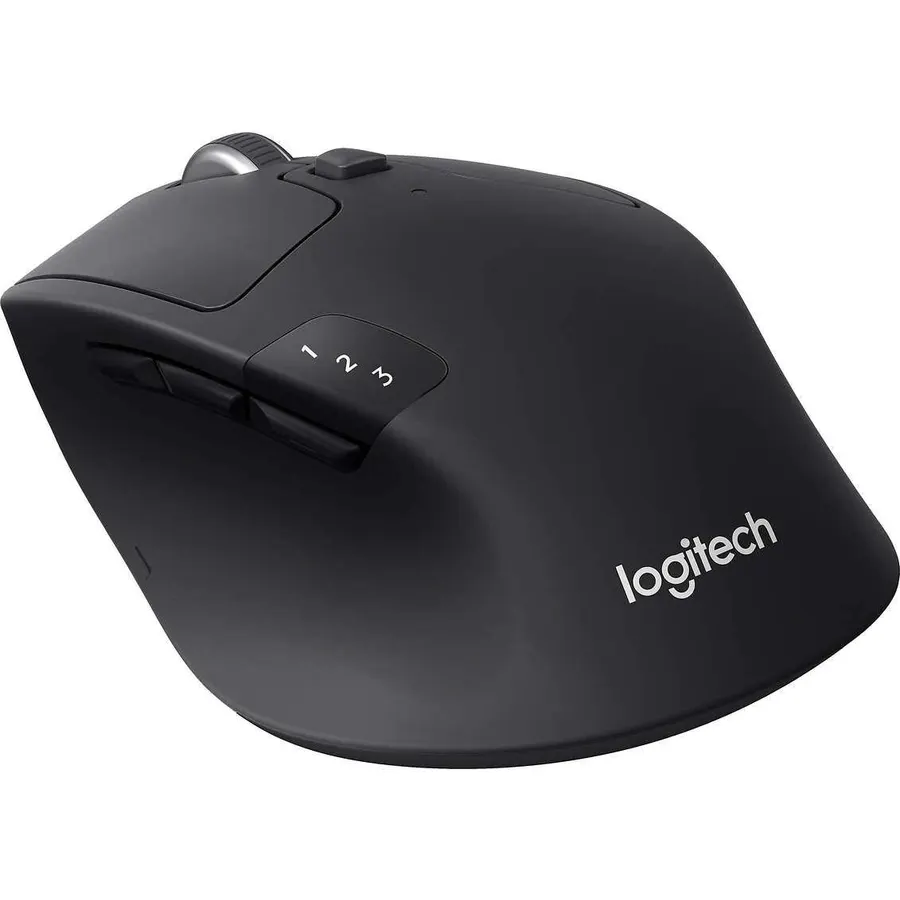
A trackball does not move. Your hand stays in one place and a thumb or finger rolls a ball to steer the cursor, which is why trackballs survive in offices full of people with sore wrists, on desks with no room for a mouse, and in the hands of engineers who never gave them up. We ranked the trackball mice in our mice catalog by ball position and size, how the shape supports the hand, connection and battery, button count and software, and what thousands of owners report after months of use.
We have not tested every one of these ourselves; the verdicts rest on the spec sheets and on the owner review history. Prices are not printed because they change daily; every button opens the live Amazon page. If a trackball is a step too far, our ergonomic mouse for wrist pain guide covers vertical and sculpted mice, and the wireless mouse for productivity guide covers conventional mice for desk work.
How we picked
- Both ball styles. Thumb-operated trackballs (M575S, M501, MX Ergo S) and finger-operated centre balls (Orbit, Trackman Marble) are both here.
- Ergonomic intent. Every pick is shaped to hold the hand still and relaxed; novelty trackballs were left out.
- Connection and battery were weighed, with wireless models needing at least a year on a cell or a quick USB-C charge.
- Owner ratings of 4.3 stars or better; four of the five picks have more than 2,000 reviews.
- Honesty about age. Two picks are old designs that still sell; their quirks and pricing are stated.
The picks
Logitech Ergo M575S Wireless Bluetooth Trackball Mouse - Graphite Blue Ball
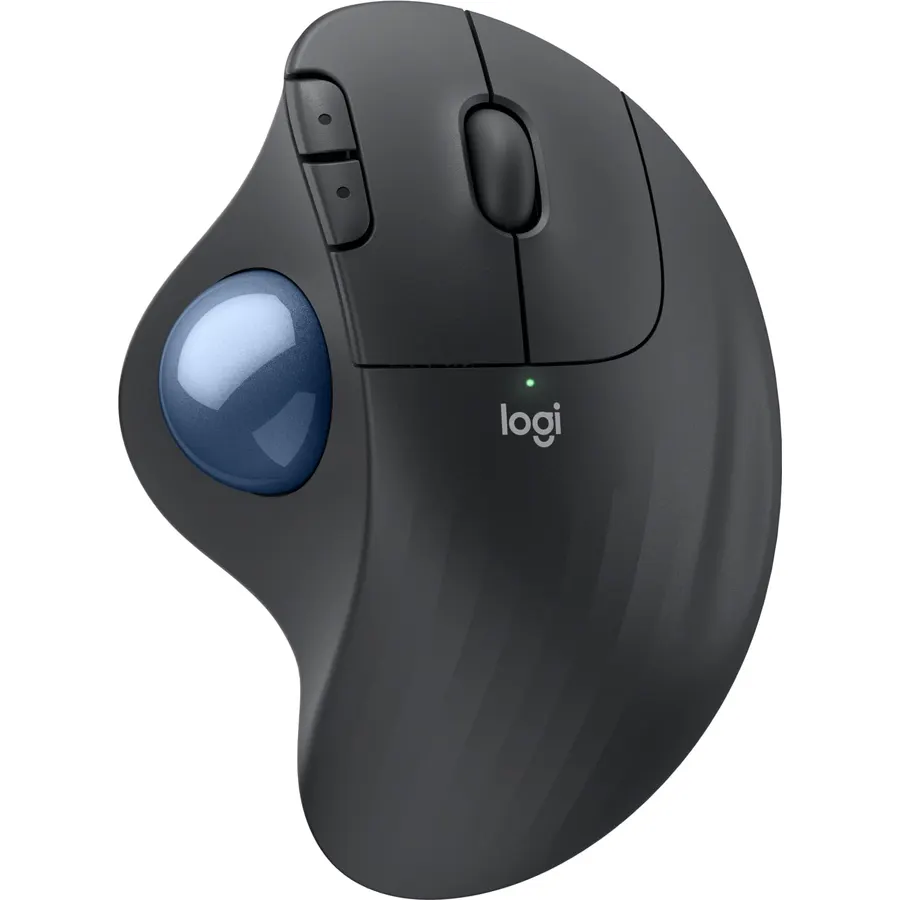
The Ergo M575S is the trackball to start with. A thumb-operated ball sits under a sculpted right-handed shell that Logitech developed with its Ergo Lab and had certified by ergonomists, and the company claims 25 percent less forearm muscle strain than a standard mouse because the arm never moves. It connects over Bluetooth or the included Logi Bolt receiver, runs up to 18 months on a single AA, and this S version adds quiet clicks. Three buttons are customisable in Logi Options+ with Smart Actions, and cursor speed is adjustable so the thumb can cover a big monitor. It is right-handed only and the ball, like all trackballs, needs a wipe every few weeks. About 2,300 owners rate it 4.4 stars, most of them converts who say their wrist pain eased within a fortnight.
- Sculpted shape developed with the Logi Ergo Lab, fits most hand sizes
- Bluetooth and Bolt, with 18 months on one AA
- Quiet clicks on this S version
- 4.4 stars from about 2,300 owners
- Right-handed only
- Thumb ball takes a few days to learn
- Ball needs occasional cleaning to roll smoothly
Nulea M501 Wireless Trackball Mouse Ergonomic Thumb Control,4 DPI Levels
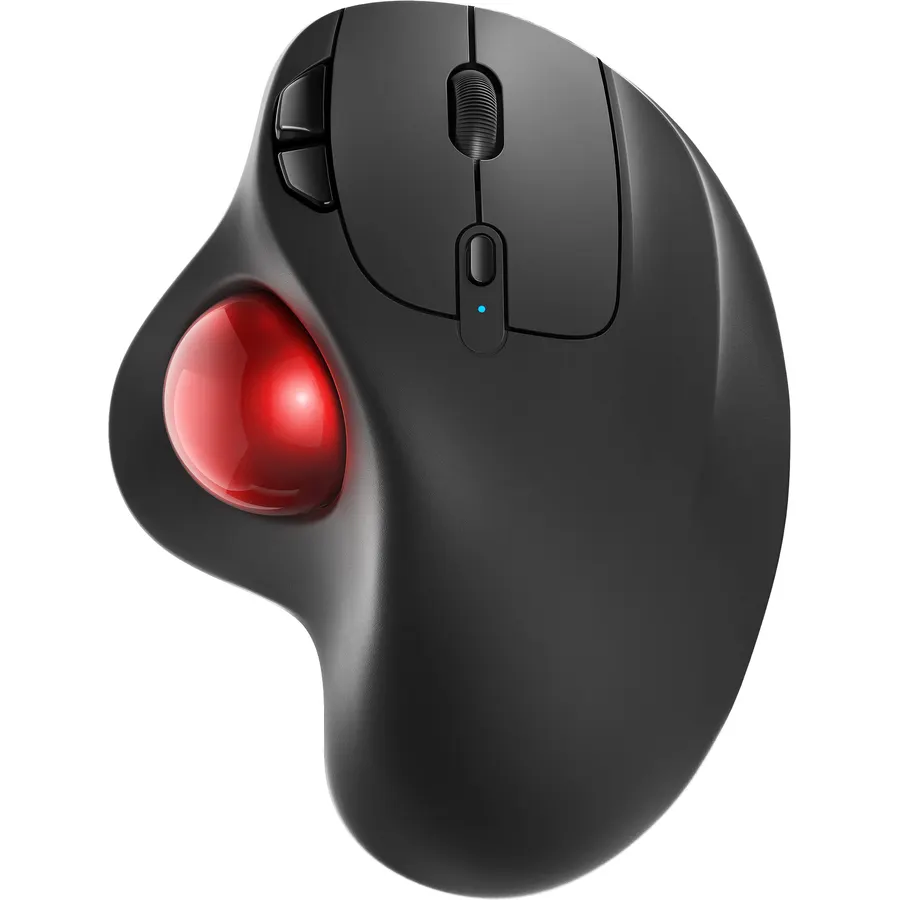
The Nulea M501 is the trackball that proves the idea does not need a premium price. It copies the thumb-ball layout of the Logitech, adds Back and Forward buttons for six in total, offers four DPI levels, and connects to up to three devices over Bluetooth or a 2.4 GHz dongle stored in the base. A built-in battery recharges over a cable rather than taking AAs. About 12,700 owners rate it 4.4 stars, the largest review base of any trackball on Amazon, and the pattern in the reviews is clear: the shape and multi-device pairing win people over, while the ball does not roll quite as smoothly as a Logitech and benefits from a clean. It is right-handed only. For anyone curious about trackballs who does not want to spend much to find out, start here.
- About 12,700 owner reviews at 4.4 stars, the most of any trackball
- Pairs with three devices by Bluetooth or dongle
- Rechargeable, so no batteries to buy
- Six buttons at a budget price
- Build and ball smoothness are a step below Logitech
- Right-handed only
- Dongle hides in the base and is easy to misplace
Kensington Orbit Trackball Mouse with Scroll Ring (K75327WW), Black-Grey
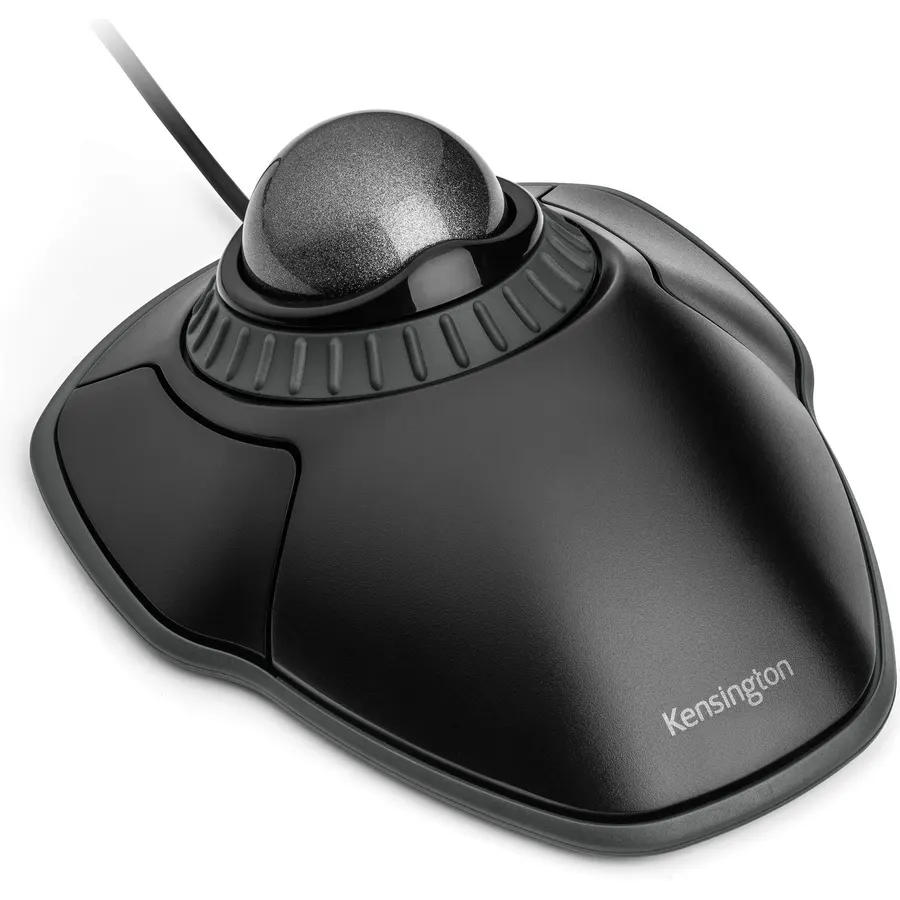
The Orbit with Scroll Ring is the trackball for left-handers and for anyone who prefers steering with the fingers rather than the thumb. The ball sits in the centre of a symmetrical body with one large button either side, and a ring around the ball turns to scroll, which owners find faster than a wheel once learned. A cushioned wrist rest clips onto the front and detaches for travel. KensingtonWorks software lets you assign functions to the two buttons and tune cursor and scroll speed. It is wired, it has only two buttons, and the ball is smaller than on Kensington’s pricier Expert models, so precise work takes practice. About 7,600 owners rate it 4.3 stars, and it is the cheapest way to try a finger trackball.
- Works for left and right hands
- Scroll Ring is quick and intuitive
- Detachable wrist rest included
- About 7,600 owner reviews at 4.3 stars
- Only two buttons
- Wired
- Ball is smaller than on the Kensington Expert models
Logitech MX Ergo S Advanced Wireless Trackball Mouse USB C - Graphite
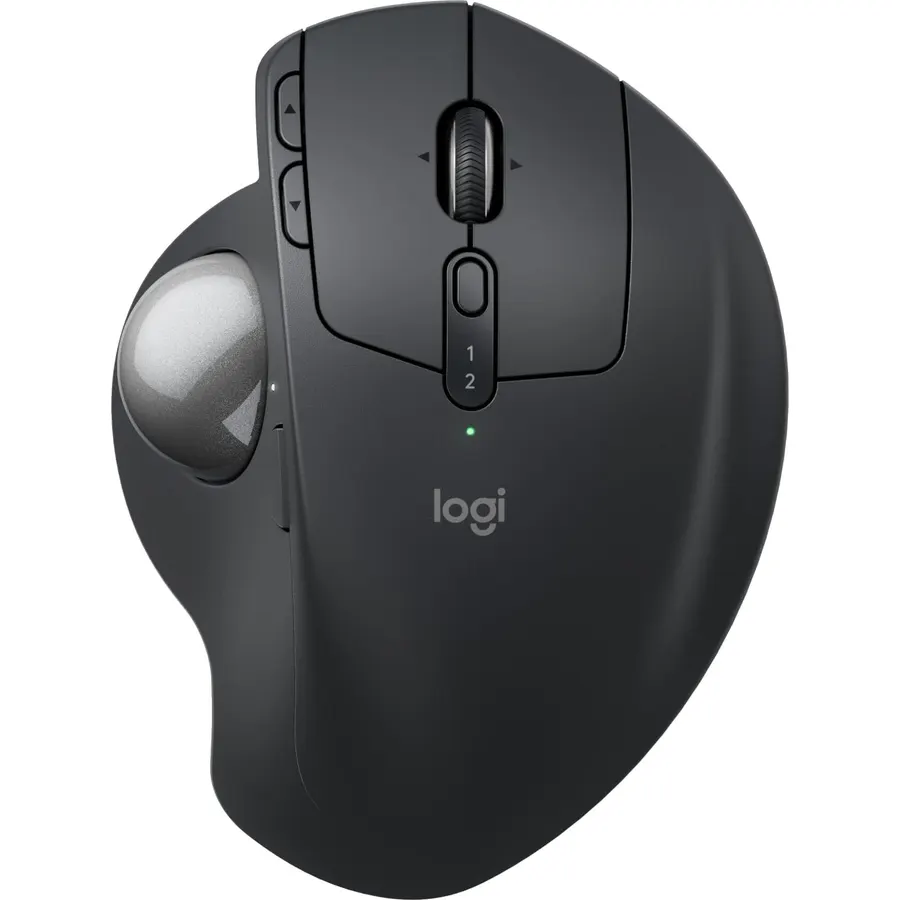
The MX Ergo S is the trackball Logitech builds for people who have already decided they want one. It keeps the thumb ball but adds a metal plate that tilts the whole mouse to 20 degrees, which the company says cuts forearm muscle activity by 27 percent, and a precision button on top that slows the cursor for photo editing or CAD. Six buttons are customisable, it pairs with two devices over Bluetooth or Logi Bolt with an Easy-Switch button, and the S revision brings USB-C charging and clicks 80 percent quieter than the old MX Ergo. A one-minute charge gives a day of use and a full charge lasts up to 120 days. It is sized for medium to large right hands and costs more than two M575S units. About 810 owners rate it 4.5 stars, the highest score on this page.
- Hinged base tilts to 20 degrees for a more natural forearm angle
- Precision button slows the cursor for fine work
- USB-C: a minute of charge gives a day of use
- 4.5 stars from about 810 owners
- The most expensive trackball here
- Right-handed, for medium to large hands
- Heavy because of the metal tilt plate
Logitech Trackman Marble Trackball Mouse, Wired USB Ergonomic Mouse for Computers, with 4 Programmable Buttons, Dark Gray
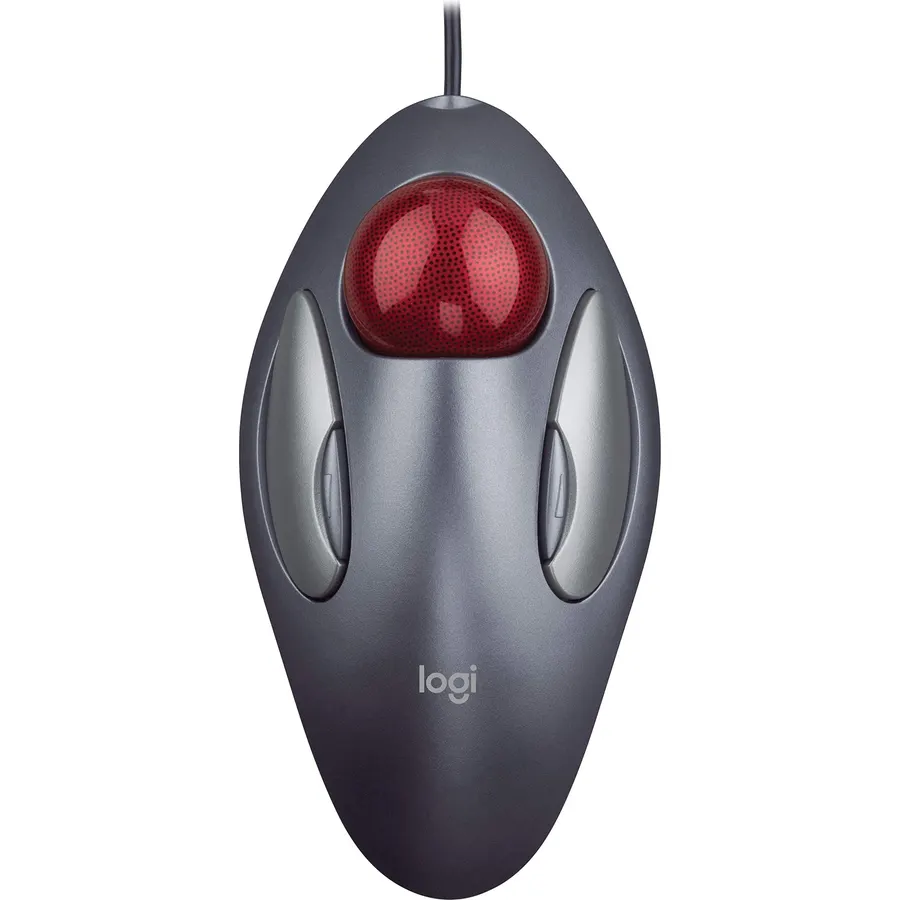
The Trackman Marble is the finger trackball that a generation of engineers and editors refuse to retire, and about 12,000 owners rate it 4.6 stars, the best score on this page. A large red ball sits in the middle of a low ambidextrous body with two big buttons and two small ones, all programmable, and the optical Marble tracking is smooth and precise. There is no scroll wheel; you hold a button and roll the ball, which long-time users swear by and newcomers find strange. It is wired and plug-and-play. The catch is that Logitech has stopped making it, so the listing is served by third-party sellers and the price moves unpredictably, sometimes far above what the mouse once cost. Check the live page before you buy; if it is sensible, it remains a superb finger trackball.
- About 12,000 owner reviews at 4.6 stars, the highest-rated trackball here
- Large ball and ambidextrous shape
- Four programmable buttons
- Wired, so nothing to charge or pair
- No scroll wheel; scrolling is a button-plus-ball gesture
- Discontinued, so Amazon pricing from resellers swings wildly
- Wired only
Compare the picks
| Product | Ball | Hand | Connection | Buttons | Owner rating | Our score | |
|---|---|---|---|---|---|---|---|
| Logitech Ergo M575SLogitech | Thumb | Right | Bluetooth or Bolt, AA 18 months | 3 + wheel | 4.4 (2,300+) | 8.8 | See price |
| Nulea M501Nulea | Thumb | Right | Bluetooth or dongle, rechargeable | 6 + wheel | 4.4 (12,700+) | 8.8 | See price |
| Kensington Orbit Scroll RingKensington | Finger, centre | Either | USB cable | 2 + Scroll Ring | 4.3 (7,600+) | 8.6 | See price |
| Logitech MX Ergo SLogitech | Thumb, 20-degree tilt | Right | Bluetooth or Bolt, USB-C | 6 + wheel + precision | 4.5 (810+) | 9.0 | See price |
| Logitech Trackman MarbleLogitech | Finger, centre, large | Either | USB cable | 4, no wheel | 4.6 (12,000+) | 9.2 | See price |
Thumb ball or finger ball?
Thumb trackballs (Ergo M575S, Nulea M501, MX Ergo S) look like a normal mouse with a ball where the thumb rests. The fingers click and scroll as usual, so the learning curve is short, and the sculpted shells support the hand well. They are right-handed only and the thumb tires on very large monitors until you raise the cursor speed. Finger trackballs (Kensington Orbit, Trackman Marble) put a bigger ball in the centre and use the index and middle fingers to roll it, with the thumb and ring finger on the buttons. They are ambidextrous, more precise for fine work because fingers are more dexterous than a thumb, and take longer to learn. Try a thumb ball first unless you are left-handed or do detailed graphics work.
Trackballs for wrist pain
A trackball removes the two movements that aggravate most mouse-related wrist pain: dragging the arm across the desk and bending the wrist sideways to reach. Logitech quotes 25 percent less forearm muscle strain for the M575S and 27 percent for the tilted MX Ergo S, and owner reviews of both are full of people whose discomfort eased within weeks. The Kensington Orbit adds a cushioned wrist rest. None of these is a medical device, and a trackball shifts load to the thumb or fingers rather than removing it, so if pain persists see a professional. Pair the trackball with a keyboard that keeps the hands close together; our quiet keyboards for office guide has compact options.
Cleaning, connection and software
Every trackball collects skin oil and dust under the ball, and a cursor that starts to skip is almost always a dirty ball or bearings. Pop the ball out from underneath, wipe it and the three small bearings, and it rolls like new; owners of every pick here mention doing this monthly. Wireless picks (M575S, M501, MX Ergo S) pair over Bluetooth or a receiver and switch between devices; the Kensington and Trackman Marble are wired and never need charging. Logi Options+ and KensingtonWorks handle button mapping and cursor speed, and raising the speed is the single setting that makes a thumb ball comfortable on a big screen.
Are trackball mice better for carpal tunnel and wrist pain?
Many owners find them easier on the wrist because the arm and wrist stay still while the thumb or fingers move the ball. Logitech quotes 25 to 27 percent less forearm muscle strain for its models. They are not a treatment, and the load moves to the thumb, so see a professional if pain persists.
How long does it take to get used to a trackball?
Most owners report a few days for a thumb trackball such as the Ergo M575S and one to two weeks for a finger trackball such as the Kensington Orbit. Raising the cursor speed in the software shortens the adjustment on large monitors.
Can I game with a trackball?
Casual and strategy games, yes. Fast shooters are difficult because flicking a ball is slower and less repeatable than moving a light mouse. The MX Ergo S precision button helps with careful aiming but it is not a gaming device.
Which trackball works for left-handed users?
The Kensington Orbit with Scroll Ring and the Logitech Trackman Marble are ambidextrous finger trackballs. All three thumb trackballs here, the M575S, Nulea M501 and MX Ergo S, are right-handed only.
Why does my trackball cursor skip or stick?
The ball or the small bearings under it are dirty. Remove the ball from underneath, wipe it and the bearings with a dry cloth or cotton swab, and replace it. Owners of every trackball here do this every few weeks.
Prices and stock change daily. The buttons above open Amazon so you always see the current price. We may earn a commission if you buy through them, at no extra cost to you.
Do Best Deal is a participant in the Amazon Services LLC Associates Program. As an Amazon Associate we earn from qualifying purchases. If you buy through links on this site we may earn a commission, at no extra cost to you. Learn more.